Table of Contents
Introduction
In today’s digital world, efficient data transfer is crucial for both personal and professional use. Whether you’re transferring files between devices, connecting peripherals, or setting up a network, selecting the right cable for data transfer can significantly impact performance and reliability. This comprehensive guide explores everything you need to know about data transfer cables, from understanding different types to optimizing their use for your specific needs.
Understanding Data Transfer Cables
What Are Data Transfer Cables?
Data transfer cables are specialized wires designed to transmit digital information between devices. They come in various forms, each suited for specific applications and compatible with different hardware. These cables ensure reliable and fast data transmission, making them essential for tasks ranging from simple file transfers to complex network setups.
Key Components of Data Transfer Cables
Every data transfer cable consists of several key components that affect its performance:
- Conductors: The internal wires that carry electrical signals. High-quality conductors ensure minimal signal loss.
- Insulation: Protects the conductors from physical damage and electrical interference.
- Connectors: The ends of the cable that plug into devices. Different connectors are compatible with specific ports.
- Shielding: Reduces electromagnetic interference (EMI) to maintain signal integrity over longer distances.
Types of Data Transfer Cables
USB Cables
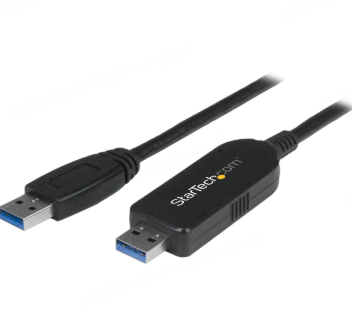
USB (Universal Serial Bus) cables are the most common type of data transfer cable, widely used for connecting peripherals like keyboards, mice, and external drives. There are several USB versions, each with different transfer speeds:
- USB 2.0: Offers transfer speeds up to 480 Mbps, suitable for basic file transfers.
- USB 3.0/3.1: Provides faster speeds up to 5 Gbps, ideal for large files.
- USB 3.2: Supports speeds up to 20 Gbps, perfect for high-resolution media transfers.
- USB 4: The latest standard, offering speeds up to 40 Gbps and compatibility with Thunderbolt 3.
HDMI Cables
HDMI (High-Definition Multimedia Interface) cables are designed for transmitting both audio and video data. They are commonly used to connect devices like laptops, gaming consoles, and streaming devices to displays. HDMI versions vary in bandwidth and supported features:
- HDMI 1.4: Supports 4K resolution at 30 Hz and basic 3D capabilities.
- HDMI 2.0: Enhances 4K resolution to 60 Hz and adds HDR support.
- HDMI 2.1: Offers 4K at 120 Hz, 8K at 60 Hz, and advanced HDR for future-proofing.
Ethernet Cables
Ethernet cables are essential for wired network connections, providing stable and fast internet speeds. Common types include:
- Cat5e: Supports up to 1 Gbps and is suitable for basic networking needs.
- Cat6: Offers improved performance with speeds up to 10 Gbps over shorter distances.
- Cat6a: Enhances Cat6 capabilities with reduced crosstalk and extended 10 Gbps support over longer distances.
- Cat7/7a: Features shielded pairs for minimal interference and supports speeds up to 100 Gbps.
Thunderbolt Cables
Thunderbolt technology combines ultra-fast data transfer with display capabilities. Thunderbolt 3 and 4 cables support speeds up to 40 Gbps and can power devices, making them versatile for professional workflows.
Factors to Consider When Choosing a Data Transfer Cable
Transfer Speed Requirements
The speed you need depends on your use case. For basic file transfers, USB 2.0 or Cat5e may suffice. However, for large files, 4K video, or professional applications, consider faster options like USB 3.2, Thunderbolt, or Cat6a.
Device Compatibility
Ensure the cable’s connectors match the ports on your devices. For example, USB-C is becoming standard on many newer devices, while HDMI is universal for audiovisual equipment.
Cable Length and Signal Integrity
Longer cables can introduce signal loss. For distances exceeding 10 meters, consider cables with active signal boosting or opt for fiber-optic alternatives for critical applications.
Durability and Build Quality
Invest in cables with robust construction, especially if they will be frequently moved or used in high-traffic areas. Look for reinforced connectors and durable insulation.
How to Optimize Data Transfer Cables
Proper Cable Management
Organize cables neatly to prevent tangling and damage. Use cable ties or clips to keep them secure and away from potential hazards.
Updating Drivers and Firmware
Ensure connected devices have the latest drivers and firmware to maximize transfer speeds and compatibility.
Regular Maintenance
Inspect cables periodically for physical damage. Replace frayed or broken cables immediately to avoid data transfer issues.
Future-Proofing Your Data Transfer Setup
Emerging Technologies
Stay informed about upcoming standards like USB4 and HDMI 2.1 to future-proof your investments. These technologies promise even faster speeds and enhanced capabilities.
Modular Connectivity
Consider using adapters or docking stations to maintain flexibility as your devices and needs evolve.
FAQs
Q: Can I use a USB 3.0 cable with a USB 2.0 port?
A: Yes, USB 3.0 cables are backward compatible with USB 2.0 ports. However, transfer speeds will be limited to USB 2.0 rates.
Q: What’s the maximum length for an HDMI cable without signal loss?
A: Standard HDMI cables can reliably transmit signals up to 5 meters. For longer distances, use HDMI extenders or fiber-optic cables.
Q: Are all Ethernet cables suitable for outdoor use?
A: No, standard Ethernet cables are designed for indoor use. For outdoor installations, use weather-resistant cables rated for outdoor environments.
Q: Can Thunderbolt cables be used for non-Thunderbolt devices?
A: Thunderbolt cables often use USB-C connectors, which can be used with USB-C devices. However, Thunderbolt features won’t function unless both devices support Thunderbolt.
Q: How do I troubleshoot slow data transfer speeds?
A: Check for damaged cables, ensure drivers are updated, verify compatibility between devices, and consider upgrading to faster cable standards if needed.
Conclusion
Selecting the right cable for data transfer is vital for ensuring efficient and reliable connections in today’s digital landscape. By understanding the different types of cables, their capabilities, and how to optimize their use, you can make informed decisions that enhance performance and future-proof your setup. Whether for everyday tasks or professional demands, the right cable makes all the difference.
How to Purchase:https://looperbuy.com/search?keywords=cable+for+data+transfer