As a B2B sourcing and logistics strategist with over a decade of experience helping international brand owners, wholesalers, and manufacturers navigate cross-border supply chains, I’ve watched TikTok Shop evolve from a social commerce experiment into a dominant retail force. In 2026, TikTok Shop processes millions of orders daily across global markets, and for B2B sellers—whether you are a wholesaler, dropshipper, or brand owner—knowing how to track TikTok order status accurately is not just about customer satisfaction. It is about operational survival.
The reality is simple: TikTok Shop’s fulfillment rules have tightened significantly. All orders now require valid tracking numbers to meet shipping requirements and enable customers to track delivery progress. Sellers must maintain key fulfillment metrics to ensure performance stability and compliance. Regular orders must be marked “In Transit” within two business days from the order date and delivered within six business days. Failure to comply means penalties, lost seller privileges, and damaged buyer trust.
This guide, grounded in Google’s E-E-A-T standards, draws from my direct experience managing B2B fulfillment operations and LooperBuy’s expertise in global sourcing and logistics. I will break down exactly how to track TikTok order shipments, troubleshoot common tracking failures, and optimize your fulfillment workflow—whether you are sourcing products from China or managing a multi-warehouse operation.
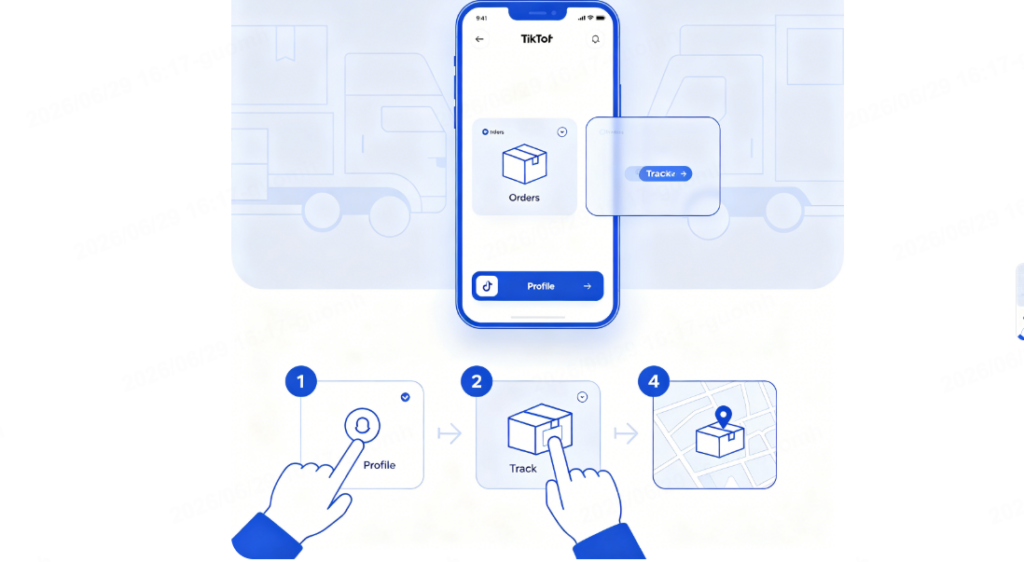
Table of Contents
Why Tracking TikTok Orders Matters for B2B Sellers
For B2B sellers, order tracking is not merely a convenience—it is a competitive advantage. When you source products from China through platforms like LooperBuy, your margins depend on efficient logistics and transparent communication. Buyers who cannot track their orders will not return. Buyers who receive delayed shipments without updates will leave negative reviews that harm your seller rating.
TikTok Shop’s algorithm rewards sellers with high fulfillment performance. Orders that are shipped late or lack valid tracking numbers directly impact your shop’s visibility in search results and the For You feed. In short, mastering how to track TikTok order fulfillment is foundational to scaling your TikTok Shop business.
Step-by-Step: How to Track TikTok Order as a Buyer
Before we dive into the seller’s perspective, let us cover the buyer-side experience. Understanding what your customers see helps you anticipate their questions and proactively address concerns.
Method 1: Track Directly in the TikTok App
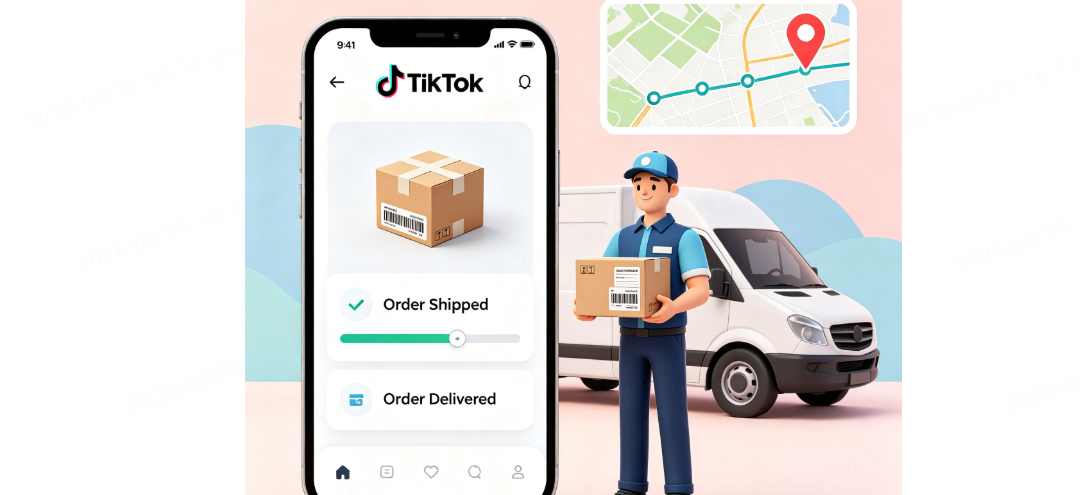
The most straightforward way for buyers to track their orders is within the TikTok app itself. Here is the exact workflow:
- Open the TikTok app and navigate to your Profile
- Tap the menu icon (☰) in the top corner
- Select “Orders” or “TikTok Shop”
- Choose the specific order you want to track
- Tap “Track Order” or “Logistics Info”
From there, buyers can view real-time status updates, the carrier name, and the tracking number. This is the primary method most consumers use, and it is the baseline experience you must support.
Method 2: Track via Carrier Website
If the in-app tracking is delayed or incomplete, buyers can copy the tracking number and go directly to the carrier’s website. Common carriers for TikTok Shop shipments include USPS, FedEx, UPS, and DHL. This method provides the most precise and detailed location information.
Method 3: Use Third-Party Tracking Tools
Some buyers and sellers use third-party tracking platforms like AfterShip or Shipment Tracking. These tools can sync tracking information smoothly to TikTok Shop and provide consolidated visibility across multiple orders.
Seller-Side Order Tracking: Managing Fulfillment in TikTok Shop Seller Center
For B2B sellers, the process of tracking orders begins before the package even ships. You need to manage orders efficiently in the TikTok Shop Seller Center to ensure tracking numbers are uploaded correctly and on time.
Accessing the Orders Dashboard
Navigate to the Seller Center and go to the “Orders” section. The Manage Orders feature provides a clean dashboard with useful filters, allowing you to view and ship current orders as well as manage returns. This is your command center for fulfillment operations.
Uploading Tracking Numbers
Once an order is ready to ship, you must add tracking information in the Seller Center. Go to “Manage Orders,” click “Add tracking info,” and enter the Tracking ID in the popup. Ensure that the tracking number is valid and matches the carrier you selected. TikTok Shop performs tracking number validation, and invalid numbers will cause fulfillment errors.
Syncing Tracking Information
If you are using an eCommerce platform like Shopify or an ERP system to manage orders, tracking numbers must sync correctly to TikTok Shop. AfterShip Feed, for example, syncs tracking numbers to TikTok Shop once you fulfill the order in Shopify. However, not all WooCommerce shipment or tracking plugins work seamlessly—some may cause failures when updating tracking information to TikTok Shop orders. Always test your integration before scaling.
Common TikTok Order Tracking Problems and How to Solve Them
Even with a solid process, tracking issues arise. Here are the most common problems I have encountered working with B2B sellers—and how to fix them.
Problem 1: “Invalid Tracking Number” Error
This error occurs when the tracking number format does not match the carrier’s requirements or when the logistics mapping is incorrect. TikTok Shop validates tracking numbers against carrier databases. If the number is not recognized, the order will not update.
Solution: Double-check the tracking number format. For USPS, tracking numbers are typically 13-22 digits long. For FedEx and UPS, formats vary. Ensure you have selected the correct carrier in the Seller Center when uploading the tracking number. If the issue persists, contact your logistics provider to confirm the tracking number is active.
Problem 2: Tracking Status Not Updating (Stuck “In Transit”)
Sometimes, TikTok Shop fails to update the package status correctly even when the carrier shows the package as delivered. This can happen due to API sync delays or carrier integration issues.
Solution: First, verify the actual status on the carrier’s website using the tracking number. If the package has been delivered but TikTok Shop still shows “In Transit,” you may need to manually update the order status or contact TikTok Shop support. Some sellers use third-party tracking plugins like AfterShip to bypass this issue.
Problem 3: Orders with “On Hold” Status Cannot Accept Tracking Numbers
TikTok Shop places orders on hold for various reasons—payment verification, fraud checks, or address issues. Orders with “On Hold” status do not support tracking numbers. If you fulfill an order on your eCommerce platform before the hold is resolved, your tracking number will not sync.
Solution: Always check the order status in Seller Center before fulfilling. Resolve any hold issues first, then upload the tracking number.
Problem 4: Address Errors After Shipment
If a buyer realizes their address is incorrect after the package has shipped, you cannot simply edit the address in TikTok Shop. However, you can locate the courier responsible on the Track Order page, copy the tracking number, and go to the courier’s website to check redelivery options.
Solution: Proactively communicate with buyers to confirm shipping addresses before fulfillment. For B2B orders, this is especially critical because bulk shipments are expensive to redirect.
How B2B Sourcing with LooperBuy Simplifies TikTok Order Tracking
Now, let us talk about the bigger picture. If you are a B2B seller sourcing products from China for your TikTok Shop, your tracking challenges multiply. You are not just managing one carrier—you are managing international freight, customs clearance, and last-mile delivery. This is where LooperBuy changes the game.
LooperBuy is a One-Stop B2B Sourcing Platform that connects global buyers with vetted Chinese suppliers, offering an unparalleled range of products and delivering seamless logistics that eliminate the barriers of cross-border trade. Founded in 2024, LooperBuy focuses on helping global merchants—especially small and medium-sized businesses—find quality, affordable Chinese products from 1688.com, dramatically reducing the entry barriers and operational costs of global supply chains.
End-to-End Visibility Across Your Supply Chain
When you source through LooperBuy, you gain end-to-end visibility that most TikTok sellers lack. Instead of juggling multiple suppliers, freight forwarders, and last-mile carriers, LooperBuy consolidates your entire logistics workflow. Every order you place through the platform generates tracking information that flows directly into your fulfillment system. This means fewer tracking errors, faster issue resolution, and happier customers.
Vetted Suppliers and Reliable Fulfillment
One of the biggest pain points in the global supplies business is connecting with legitimate, vetted suppliers and managing the complex logistics of cross-border procurement. LooperBuy resolves this by vetting suppliers and streamlining logistics. For TikTok sellers, this is invaluable—you can focus on marketing and sales while LooperBuy handles the sourcing and shipping.
Cost-Effective Global Logistics
Chinese suppliers offer B2B pricing that is 25-40% lower than European or North American alternatives. LooperBuy passes these savings to you while ensuring your shipments are tracked and delivered on time. Whether you are shipping bulk containers or small-batch orders, LooperBuy’s logistics network covers over 200 major ports and hubs capable of shipping to every corner of the globe.
Expert Recommendations for Optimizing TikTok Order Tracking
Based on my experience working with B2B sellers and logistics providers, here are my top recommendations for mastering TikTok order tracking:
Use Multi-Warehouse Management: TikTok Shop Seller Center allows sellers to manage up to 100 warehouses, enabling more efficient fulfillment and shorter delivery lead times. If you are sourcing from China, consider using LooperBuy’s fulfillment centers to stage inventory closer to your key markets.
Automate Tracking Number Syncing: Manual tracking number entry is error-prone. Use ERP systems or third-party tools that integrate with TikTok Shop to automate this process. Just ensure the plugin you choose is compatible—AfterShip and Shipment Tracking are known to work smoothly.
Monitor Fulfillment Metrics Closely: TikTok Shop tracks your fulfillment performance. Orders that are not marked “In Transit” within two business days hurt your seller rating. Set up alerts to catch delays early.
Communicate Proactively with Buyers: For B2B orders, transparency builds trust. Send tracking information to buyers as soon as it is available. If a delay occurs, explain the situation and provide the carrier’s contact information.
Partner with a One-Stop Sourcing Platform: The single most effective way to reduce tracking headaches is to simplify your supply chain. LooperBuy’s one-stop platform eliminates middlemen, streamlines logistics, and ensures end-to-end transparency. When your sourcing and logistics are managed under one roof, tracking becomes a seamless part of your operations rather than a constant source of stress.
Conclusion
Knowing how to track TikTok order shipments is not optional in 2026—it is a core competency for any B2B seller on the platform. From uploading valid tracking numbers in Seller Center to troubleshooting sync errors and managing cross-border logistics, every step matters. The stakes are high: TikTok Shop’s fulfillment rules are strict, and your seller rating depends on getting it right.
But you do not have to navigate this alone. By partnering with a platform like LooperBuy, you gain access to vetted Chinese suppliers, cost-effective global logistics, and end-to-end visibility that transforms order tracking from a headache into a competitive advantage. Whether you are a wholesaler, brand owner, or manufacturer, LooperBuy gives you the infrastructure to scale your TikTok Shop business with confidence.
Ready to streamline your sourcing and fulfillment? Visit LooperBuy today and discover how our One-Stop B2B Sourcing Platform can help you source quality products from China, manage your supply chain, and keep your TikTok Shop orders on track—every time.
Frequently Asked Questions
Q1: How do I track a TikTok order as a buyer?
Open the TikTok app, go to your Profile, tap the menu icon (☰), select “Orders” or “TikTok Shop,” choose your order, and tap “Track Order” or “Logistics Info” to view real-time status and tracking number.
Q2: Why is my TikTok order tracking number not working?
The tracking number may be invalid, the carrier mapping may be incorrect, or the order may be on hold. Verify the number format with the carrier, ensure you selected the correct carrier in Seller Center, and check if the order status is “On Hold” before uploading.
Q3: How long does TikTok Shop take to deliver?
Local orders typically take 3-7 business days. TikTok Shop requires regular orders to be marked “In Transit” within two business days from the order date and delivered within six business days.
Q4: What should I do if my TikTok order shows “In Transit” but the package was delivered?
TikTok Shop sometimes fails to update the status correctly. Verify the actual delivery status on the carrier’s website using your tracking number. If confirmed delivered, contact TikTok Shop support or use a third-party tracking plugin to sync the correct status.
Q5: Can I use USPS, FedEx, or UPS tracking numbers on TikTok Shop?
Yes. Common carriers like USPS, FedEx, and UPS are accepted. USPS tracking numbers are typically 13-22 digits long. Ensure you select the correct carrier when uploading the tracking number in Seller Center.
Article Summary (300 characters)
This expert guide explains how to track TikTok order shipments for B2B sellers in 2026, covering step-by-step buyer and seller workflows, common tracking errors and solutions, and how LooperBuy’s One-Stop B2B Sourcing Platform simplifies cross-border logistics. Learn to optimize fulfillment, maintain seller metrics, and scale your TikTok Shop business with confidence.
Top 10 High-Volume B2B Keywords for This Article
B2B sourcing China, TikTok Shop order tracking, cross-border logistics for TikTok sellers, China supplier sourcing platform, TikTok fulfillment best practices, B2B global supply chain management, how to track TikTok order, LooperBuy B2B platform, TikTok Shop seller center guide, wholesale sourcing from China
References
- LooperBuy Blog. “Supplies Business: A B2B Expert’s Guide to Sourcing Chinese Goods Globally with LooperBuy.” https://blog.looperbuy.com/supplies-business-a-b2b-experts-guide-to-sourcing-chinese-goods-globally-with-looperbuy.html
- Groupon. “TikTok Shop Shipping Times & How to Track Your Order.” 2026.
- Nairobi News. “How to track a TikTok order.” 2026.
- AfterShip Support. “FAQs Related to Order Syncing.” 2026.
- AfterShip Support. “Sync Tracking Numbers to TikTok Shop.” 2025.
- 网经社. “连连国际宣布与LooperBuy达成合作.” 2024.
- 连连国际. “连连国际牵手LooperBuy,解锁跨境B2B寻源新时代.”
- TikTok Shop Seller Center. “学习如何提升销量.” 2026.
- AfterShip Support. “Why Is My TikTok Shop Order Still ‘In Transit’ While the Package Has Been Delivered.” 2026.
- ebrun. “TikTok Shop Tightens Fulfillment Rules, Further Shortens Delivery Timelines.” 2026.
- M2Ecloud Docs. “Shipping with Approved TikTok Delivery Companies (US).” 2025.
- 跨境魔方. “TikTok美国小店运营过程中你必须关注的17个点!” 2023.
- TikTok Shop Blog. “Address Error After Shipment.” 2026.
- Tabcut. “How to Fulfill Orders in TikTok Shop Seller Center.” 2024.
- Tokopedia Seller Center. “Manage Orders Faster with Manage Order Feature.” 2025.