Data transfer cables are essential components in our technology-driven world, facilitating the movement of data between devices. These cables are not just simple connectors; they play a crucial role in ensuring that our devices communicate effectively, whether for personal use, business applications, or entertainment. This article explores the various types of data transfer cables, their applications, technological advancements, and comparisons among them, providing a comprehensive understanding of their importance in our daily lives.
Table of Contents
Types of Data Transfer Cables
Data transfer cables come in various forms, each designed for specific applications and technologies. Understanding these types is crucial for selecting the right cable for your needs, as each type has unique features and capabilities that cater to different devices and purposes.
USB Cables
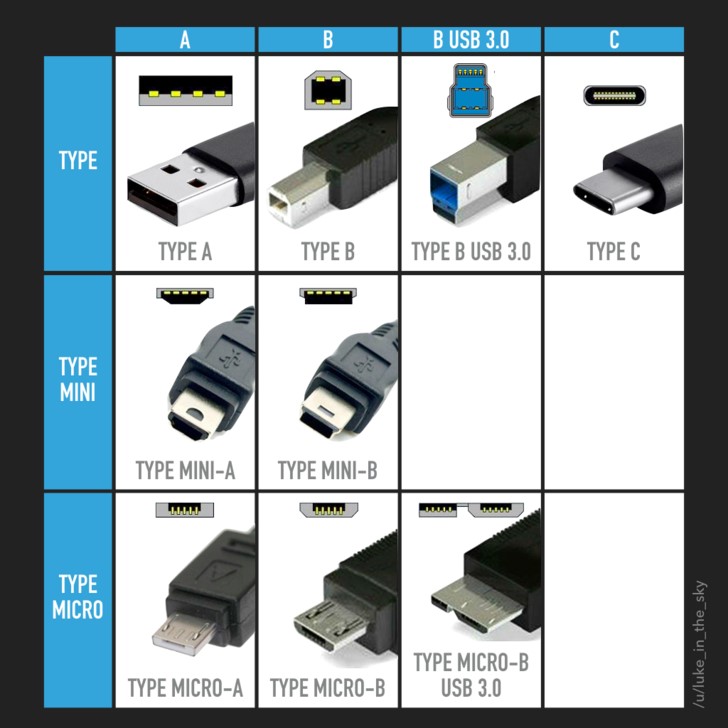
Universal Serial Bus (USB) cables are among the most common data transfer cables. They connect a wide range of devices, including computers, smartphones, and peripherals. USB cables have evolved significantly over the years, with several types available, each serving different functions.
– USB Type-A: The standard rectangular connector found on most computers and chargers. It is widely used for connecting devices like keyboards, mice, and flash drives. Its ubiquity makes it a staple in many households and offices.
– USB Type-B: Typically used for printers and other large devices. This type of connector is often found on the back of printers and external hard drives, providing a stable connection for data transfer.
– Micro USB: Commonly used for smartphones and tablets, though increasingly replaced by USB-C. Micro USB connectors are compact and have been the standard for many mobile devices for years, allowing for easy charging and data transfer.
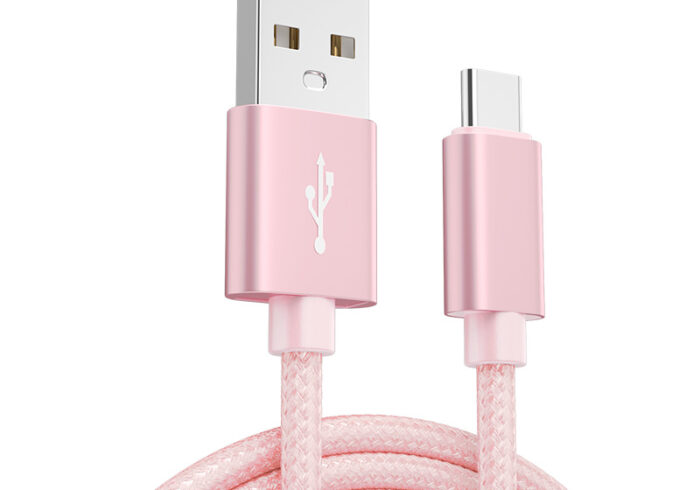
– USB-C: The latest standard, capable of transferring data, video, and power through a single cable. USB-C is becoming the universal standard for many devices due to its versatility and ability to support fast charging and high-speed data transfer.
HDMI Cables
High-Definition Multimedia Interface (HDMI) cables are primarily used for transmitting high-definition video and audio from devices like computers, gaming consoles, and televisions. HDMI cables support various resolutions and formats, including 4K and 3D, making them essential for modern home entertainment systems.
The versatility of HDMI cables allows them to connect a wide range of devices, from laptops to projectors, ensuring that users can enjoy high-quality audio and video without the need for multiple cables. Additionally, HDMI cables often come with features like Ethernet support, allowing for network connectivity through the same cable.
Ethernet Cables
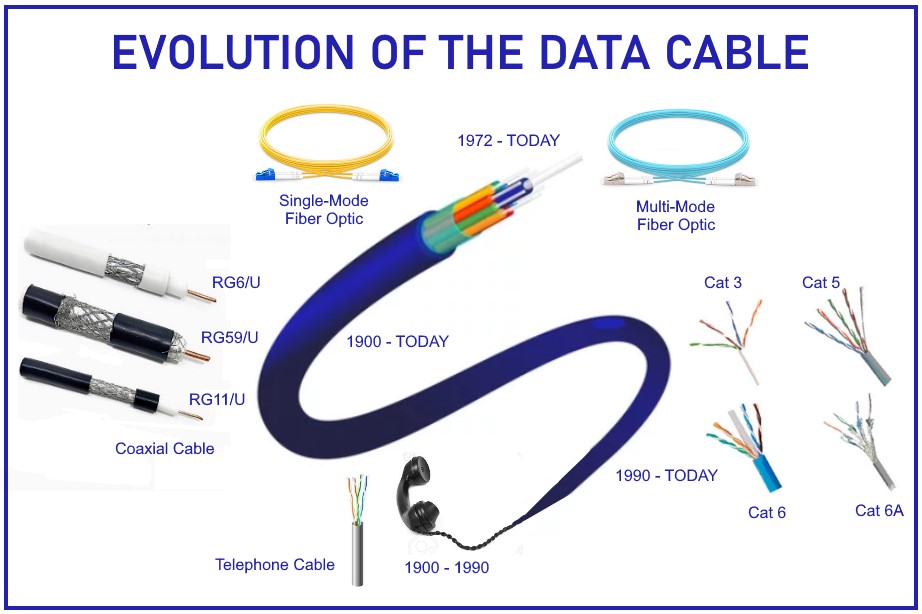
Ethernet cables are used for wired network connections, providing reliable internet access and local area network (LAN) communication. They come in several categories, each designed to support different speeds and bandwidths:
– Cat5e: Supports speeds up to 1 Gbps and is suitable for most home networking needs. It is an enhanced version of the original Cat5 cable, offering better performance and reduced interference.
– Cat6: Handles speeds up to 10 Gbps over short distances, making it ideal for high-speed internet connections and gaming. Cat6 cables are often used in environments where high data transfer rates are essential.
– Cat6a: Enhanced version of Cat6, suitable for longer distances and higher frequencies. This cable type is often used in commercial settings where extensive networking is required.
– Cat7: Supports higher frequencies and speeds, ideal for data centers and enterprise-level networking. Cat7 cables provide superior shielding against interference, ensuring stable and fast connections.
Fiber Optic Cables
Fiber optic cables use light to transmit data, offering high-speed connections over long distances. They are less susceptible to interference compared to copper cables and are commonly used in telecommunications and internet services.
The technology behind fiber optics allows for data transmission at incredible speeds, making them the preferred choice for internet service providers and large enterprises. Fiber optic cables can carry signals over much longer distances without degradation, making them ideal for connecting cities and regions.
Coaxial Cables
Coaxial cables are used for cable television and internet connections. They consist of a central conductor, insulating layer, metallic shield, and outer cover, providing durability and resistance to interference.
Coaxial cables are particularly effective in transmitting high-frequency signals, which is why they are commonly used in cable TV and broadband internet services. Their design minimizes signal loss, ensuring that users receive high-quality audio and video without interruptions.
Common Uses and Applications
Data transfer cables are integral to various applications across different fields. Here are some common uses that highlight their importance in everyday technology:
Personal Computing
In personal computing, data transfer cables connect peripherals like printers, external hard drives, and monitors. USB cables are particularly prevalent for these connections, allowing for data transfer and device charging. The ability to easily connect and disconnect devices enhances user convenience and productivity, making it easier to manage files and print documents.
Networking
In networking, Ethernet cables connect computers to routers and switches, enabling internet access and local area network (LAN) communication. Fiber optic cables are increasingly used for backbone connections in enterprise networks due to their high speed and reliability. This connectivity is crucial for businesses that rely on fast and stable internet connections for their operations.
Audio and Video
For audio and video applications, HDMI cables are the standard for connecting devices like Blu-ray players, gaming consoles, and televisions. They support high-definition video and multi-channel audio, making them ideal for home entertainment systems. The ability to transmit both audio and video through a single cable simplifies setup and enhances the viewing experience.
Mobile Devices
Mobile devices utilize various data transfer cables for charging and data synchronization. USB-C has become the standard for many smartphones and tablets, offering fast charging and data transfer capabilities. This standardization helps reduce the number of cables users need to carry, making it more convenient to charge and sync devices on the go.
Technological Advancements in Data Transfer Cables
The evolution of data transfer cables has been driven by the need for faster speeds, greater efficiency, and improved functionality. Here are some notable advancements that have shaped the landscape of data transfer technology:
Increased Data Transfer Speeds
With the introduction of USB 3.0 and later versions, data transfer speeds have significantly increased. USB 3.1 can transfer data at speeds up to 10 Gbps, while USB 3.2 can reach up to 20 Gbps. Similarly, Ethernet cables have evolved, with Cat6a and Cat7 supporting higher speeds and bandwidths. These advancements allow users to transfer large files quickly, enhancing productivity and efficiency.
Enhanced Power Delivery
Modern data transfer cables, particularly USB-C, support power delivery features that allow devices to charge faster. USB-C can deliver up to 100 watts of power, making it suitable for charging laptops and other high-powered devices. This capability reduces the need for multiple chargers and simplifies the charging process for users.
Versatility and Compatibility
Newer data transfer cables are designed to be more versatile. For instance, USB-C cables can transmit data, video, and power, reducing the number of cables needed for different devices. This versatility is particularly beneficial for users with multiple devices, as it streamlines their setup and reduces clutter.
Improved Durability
Advancements in materials and design have led to more durable data transfer cables. Many cables now feature reinforced connectors and braided exteriors to withstand wear and tear, making them suitable for everyday use. This durability ensures that users can rely on their cables for consistent performance over time, reducing the need for frequent replacements.
Comparison Between Various Data Transfer Cables
When choosing a data transfer cable, it’s essential to consider the specific requirements of your devices and applications. Here’s a comparison of some common types to help you make informed decisions:
USB vs. HDMI
USB cables are primarily used for data transfer and charging, while HDMI cables are designed for high-definition audio and video transmission. If you need to connect a computer to a monitor, HDMI is the preferred choice, whereas USB is suitable for connecting peripherals. Understanding the purpose of each cable type is crucial for optimizing your device connections.
Ethernet vs. Fiber Optic
Ethernet cables are ideal for local area networks, providing reliable connections for home and office use. However, fiber optic cables excel in long-distance data transmission, making them the preferred choice for internet service providers and large enterprises. The choice between these cables often depends on the specific networking needs and the distance over which data must be transmitted.
Coaxial vs. Ethernet
Coaxial cables are commonly used for cable television and internet services, while Ethernet cables are used for networking. Ethernet cables generally offer higher speeds and are more versatile for data transfer applications. Understanding the differences in speed, bandwidth, and application can help users select the right cable for their needs.
Conclusion
Data transfer cables are vital for connecting devices and facilitating communication in our digital world. Understanding the different types, their applications, and technological advancements can help you make informed decisions when selecting the right cable for your needs. As technology continues to evolve, data transfer cables will play an increasingly important role in our interconnected lives, enabling seamless communication and data exchange across various platforms.
How to purchase:https://looperbuy.com/search?keywords=Data+Transfer+Cables
Frequently Asked Questions
1.What is the difference between USB and USB-C?
USB-C is a newer standard that supports faster data transfer speeds and power delivery compared to older USB types. It is reversible and can connect to a wider range of devices, making it more user-friendly.
2.Can I use an HDMI cable for data transfer?
No, HDMI cables are designed for audio and video transmission, not for general data transfer. For data transfer, USB or Ethernet cables are more appropriate, depending on the devices involved.
3.What type of cable is best for gaming?
For gaming, HDMI cables are ideal for connecting consoles to TVs, while Ethernet cables provide the best internet connection for online gaming. A stable and fast connection is crucial for an optimal gaming experience.
4.Are fiber optic cables better than copper cables?
Yes, fiber optic cables offer higher speeds and greater bandwidth over longer distances compared to copper cables, making them more suitable for high-demand applications such as internet services and data centers.
5.How do I choose the right data transfer cable?
Consider the devices you are connecting, the required data transfer speed, and any additional features like power delivery when selecting a data transfer cable. Understanding your specific needs will help you make the best choice.