Table of Contents
Introduction
With the release of the iPhone 15 series in 2023, Apple has made a significant change by replacing the Lightning port with the more universal USB-C port. This shift not only aligns with the European Union’s regulations mandating USB-C as the universal charging standard but also enhances user experience by improving charging speed and data transfer capabilities. If you’re an iPhone 15 user or planning to purchase one, you might be wondering what charging cable to use. This article will provide a comprehensive guide to help you choose the right charging cable for your iPhone 15.
Charging Cable Specifications for iPhone 15 Models
iPhone 15 and iPhone 15 Plus
The iPhone 15 and iPhone 15 Plus support USB 2.0 data transfer speeds at 480 Mbps. They also support USB Power Delivery (USB-PD) fast charging, allowing for a 50% charge in approximately 30 minutes with a compatible 20W or higher USB-C charger.
iPhone 15 Pro and iPhone 15 Pro Max
The iPhone 15 Pro and iPhone 15 Pro Max offer faster charging speeds, supporting up to 27W USB-PD fast charging. With a compatible high-wattage USB-C charger, they can achieve a 50% charge in about 25 minutes. Additionally, these models support USB 3.2 Gen 2 data transfer speeds of up to 10 Gbps, enabling much faster file transfers.
Key Features of USB-C Charging Cables
Charging Speed
USB-C cables support USB-PD, a fast-charging protocol that delivers faster charging speeds compared to Lightning cables. When paired with a compatible charger, USB-C cables can significantly reduce charging time for your iPhone 15.
Data Transfer Speed
USB-C cables offer higher data transfer rates. While the iPhone 15 and iPhone 15 Plus support USB 2.0 speeds of 480 Mbps, the iPhone 15 Pro and iPhone 15 Pro Max can achieve USB 3.2 Gen 2 speeds of up to 10 Gbps, making file transfers much quicker.
Compatibility
USB-C is a widely adopted standard used by many electronic devices, including iPads, MacBooks, and Android devices. Switching to USB-C means you can use a single cable for multiple devices, simplifying your charging setup.
Recommended Charging Cables for iPhone 15
Official Apple Charging Cable
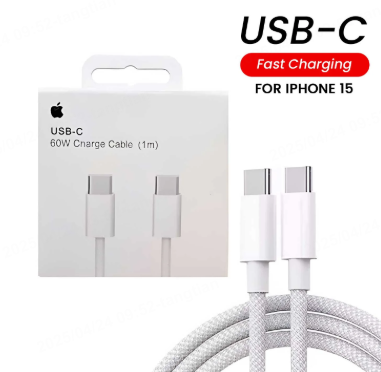
Apple provides a 1-meter USB-C to USB-C cable with the iPhone 15. This cable supports up to 60W charging and USB 2.0 data transfer speeds. For longer cables, Apple also offers a 2-meter version priced at $29.
Anker 765 USB-C to USB-C Cable
The Anker 765 USB-C to USB-C Cable supports up to 140W charging and is reinforced with nylon, making it highly durable. It can withstand up to 35,000 bends, ensuring reliable performance over time. This cable is ideal for users who value fast charging and durability.
Monoprice AtlasFlex USB-C Cable
The Monoprice AtlasFlex USB-C Cable is suitable for iPhone 15 Pro and iPhone 15 Pro Max users who require high-speed data transfer. Its USB 3.2 Gen 2 standard supports data transfer speeds of up to 10 Gbps. It also supports 100W charging and comes with a lifetime warranty, offering excellent value for general use.
UGREEN USB-C Cable
The UGREEN USB-C Cable features an exclusive e-marker smart chip that intelligently matches the required current. It supports up to 140W charging and allows for connecting your MacBook to a second monitor or display for 4K video output. Its braided design enhances durability, making it a practical choice for daily use.
Belkin BoostCharge Pro Flex USB-C Cable
The Belkin BoostCharge Pro Flex USB-C Cable combines flexibility and durability. Its reinforced connectors ensure long-term reliability. Supporting USB 2.0 data transfer and suitable for both charging and data transfer, it is a reliable option for iPhone 15 users.
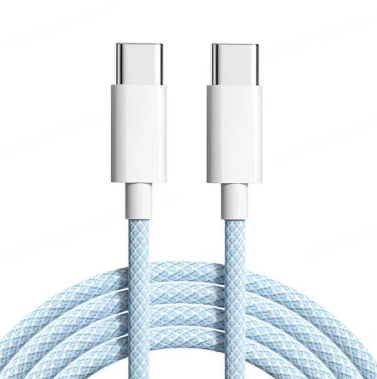
Considerations When Choosing Charging Cables for iPhone 15
Cable Type
Since the iPhone 15 uses a USB-C port, you need to select a USB-C to USB-C cable. If you plan to use a USB-A charger, you will require a USB-A to USB-C cable.
Charging Speed
If you want to enjoy fast charging, opt for cables that support USB-PD and higher wattages. For iPhone 15 Pro and iPhone 15 Pro Max users, selecting cables that support USB 3.2 Gen 2 or higher can significantly improve charging performance.
Durability
Choose cables made from high-quality materials with reinforced connectors to prevent fraying and damage. Braided cables tend to be more durable and resistant to bending and breaking.
Data Transfer Requirements
If you frequently transfer large files between your iPhone and computer, consider cables that support higher data transfer speeds, such as USB 3.2 Gen 2 or Thunderbolt-certified cables.
Brand and Certification
Opt for cables from reputable brands like Anker, UGREEN, or Belkin. Look for cables with USB-IF certification or Thunderbolt certification to ensure safety and performance.
Maintenance Tips for iPhone 15 Charging Cables
Avoid Sharp Bends
Do not bend the cable sharply or place heavy objects on it to prevent damage to the internal wires.
Proper Handling
Disconnect the cable by gripping the plug, not the cord, to avoid unnecessary strain on the cable.
Store in a Cool, Dry Place
Store the cable in a cool, dry environment to prolong its lifespan.
Regular Inspection
Regularly check the cable for signs of wear such as fraying or exposed wires. Replace the cable promptly if any damage is detected to ensure safe charging.
Conclusion
The iPhone 15 series’ adoption of USB-C brings significant improvements in charging speed and data transfer capabilities. When selecting a charging cable, consider factors such as charging speed, data transfer requirements, durability, and brand reputation. Whether you choose an official Apple cable or a high-quality third-party option like Anker or UGREEN, the right charging cable can enhance your iPhone 15 experience. By following the advice in this guide, you can find a charging cable that meets your needs and ensures optimal performance for your iPhone 15.
How to Purchase:https://looperbuy.com/search?keywords=what+charging+cable+for+iphone+15
FAQs
What type of charging cable does the iPhone 15 use?
The iPhone 15 uses a USB-C to USB-C cable. The iPhone 15 series features a USB-C port, replacing the Lightning port used in previous models, so a USB-C to USB-C cable is required for charging and data transfer .
Can I use third-party charging cables with the iPhone 15?
Yes, you can use third-party charging cables with the iPhone 15. As long as the cable supports USB-C and meets relevant standards, it should work with the iPhone 15. However, it is advisable to choose cables from reputable brands like Anker or UGREEN to ensure safety and performance .
Can I use the iPhone 15’s charging cable with other devices?
Yes, the iPhone 15’s charging cable is compatible with other USB-C devices such as iPads, MacBooks, and Android devices. This makes it convenient to use a single cable for multiple devices .
What is the difference between USB 2.0 and USB 3.2 Gen 2 cables?
USB 2.0 cables support data transfer speeds of up to 480 Mbps, suitable for iPhone 15 and iPhone 15 Plus. USB 3.2 Gen 2 cables support data transfer speeds of up to 10 Gbps, ideal for iPhone 15 Pro and iPhone 15 Pro Max users who require faster data transfers .
Does the iPhone 15 support Thunderbolt cables?
iPhone 15 Pro and iPhone 15 Pro Max are compatible with Thunderbolt cables. While Thunderbolt cables offer higher data transfer speeds, they are not necessary for basic charging and data transfer. However, using Thunderbolt-certified cables can ensure optimal performance .