Learn how PunchOut catalog integration connects supplier storefronts with enterprise procurement systems. This guide explains cXML workflows, procurement data requirements, implementation steps, security considerations, integration options, and how global B2B sourcing platforms can support controlled China product purchasing and fulfillment.
B2B buyers want the convenience of online purchasing without losing the control of their internal procurement workflows. A PunchOut catalog integration connects a supplier’s digital storefront with a buyer’s e-procurement system, allowing authorized employees to shop approved products, return their cart to the purchasing system, and complete approval before a purchase order is issued.
For global merchants sourcing products from China, this model can reduce manual quotation work, improve purchasing visibility, and make it easier to manage supplier-approved assortments. For platforms such as Looperbuy, the opportunity is to combine China sourcing, supplier coordination, fulfillment support, and catalog connectivity into a purchasing experience that works with how enterprise customers already buy.
Table of Contents
What Is a PunchOut Catalog?
A PunchOut catalog is an online supplier catalog that a buyer accesses from within an e-procurement platform such as SAP, Oracle, Coupa, JAGGAER, or Workday. Instead of maintaining a static catalog file inside the buyer’s system, the buyer “punches out” to the supplier’s live storefront.
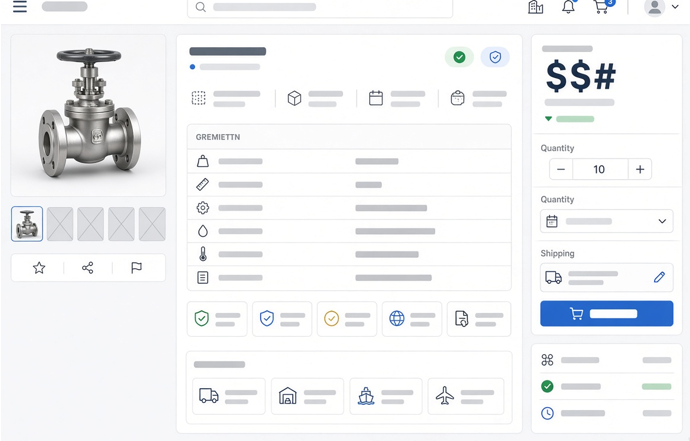
The shopper can browse products, view contract-specific pricing, select quantities, and build a cart on the supplier’s website. When finished, the cart is returned to the buyer’s procurement system as a requisition. The buyer’s internal approval process then continues as usual.
Importantly, returning the cart does not automatically place an order. In a standard cXML flow, the PunchOut order message provides cart and price information to the procurement application; the supplier receives the actual purchase order only after the buyer’s approval process is completed.
The standard PunchOut purchasing flow
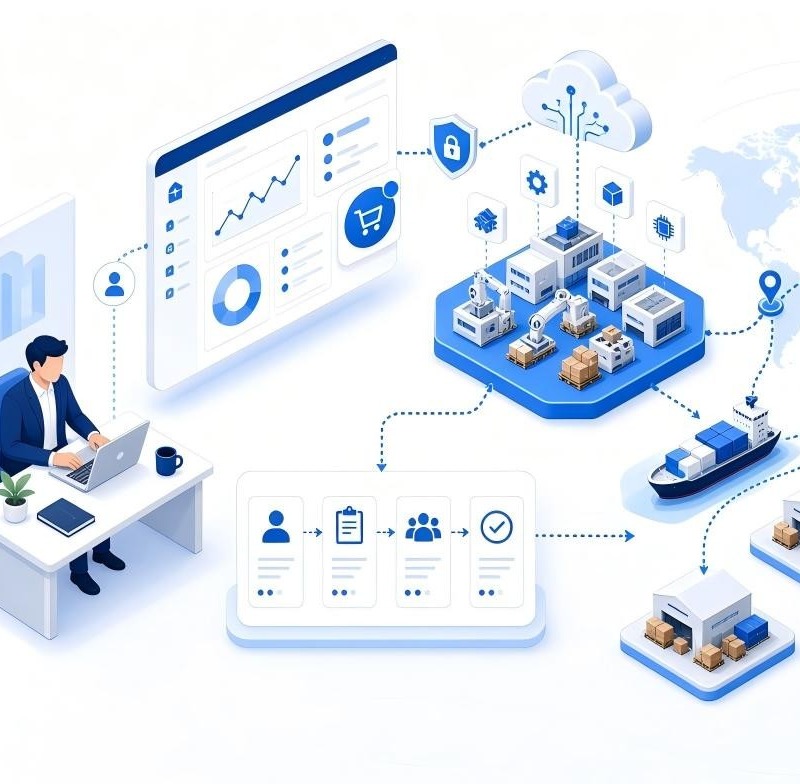
1. A buyer logs into their company’s procurement system.
2. The buyer selects an approved supplier or PunchOut catalog.
3. The procurement system sends a secure session request to the supplier’s storefront.
4. The buyer browses products, negotiated prices, availability, specifications, and minimum order quantities.
5. The buyer sends the shopping cart back to the procurement system.
6. Internal stakeholders review the requisition according to budget and approval rules.
7. The approved purchase order is sent to the supplier or sourcing partner for fulfillment.
This distinction matters. A regular B2B store typically moves a buyer from product page to checkout. A PunchOut catalog must support a controlled return journey: the cart goes back to procurement, approval occurs there, and the final purchase order triggers fulfillment.
How PunchOut Catalog Integration Works
The most widely used PunchOut approach relies on cXML, an XML-based commerce data-exchange format. In a typical cXML process, the buyer’s system sends a `PunchOutSetupRequest`, the supplier validates the request and returns a session-specific storefront URL, and the shopper enters the supplier catalog. When shopping is complete, the supplier sends a `PunchOutOrderMessage` containing the cart details back to the procurement system.
Core data exchanged during the session
| Data element | Why it matters |
| Buyer identity and credential | Confirms which organization and user may access the catalog |
| Buyer cookie or session reference | Connects the returned cart to the original shopping session |
| Supplier SKU | Identifies the item being purchased |
| Product description | Helps users and approvers understand the requested item |
| Quantity and unit of measure | Prevents ordering and conversion errors |
| Unit price and currency | Supports approval, budgeting, and purchase-order matching |
| Classification code | Helps procurement teams categorize spend |
| Delivery information | Supports lead-time expectations and shipment planning |
A well-designed integration should return accurate, actionable cart information. For example, technical buyers may need dimensions, material grade, voltage, compliance documentation, packaging configuration, or country-of-origin details—not merely a short product title.
The buyer cookie is especially important because it ties the returned cart to the originating request. Documentation for commercial PunchOut implementations identifies it as the value used by the buyer’s procurement system to associate multiple outstanding PunchOut requests with the correct session.
cXML, OCI, and platform-specific formats
Not every buyer uses the same protocol. cXML is common across many e-procurement ecosystems, while OCI is closely associated with SAP environments. Oracle Procurement supports PunchOut configurations using cXML and Oracle-native XML models, illustrating why suppliers should confirm the buyer’s technical requirements before selecting an integration approach.
For a sourcing platform, the practical question is not “Which protocol is best?” It is: Which protocol, field mapping, authentication method, and purchase-order process does this buyer require?
Why It Matters for China Sourcing
Traditional cross-border sourcing often relies on spreadsheets, emails, chat messages, manual quotations, and fragmented payment discussions. That process can work for one-off orders, but it becomes difficult to govern when multiple departments, locations, product categories, and approvers are involved.
A PunchOut-enabled sourcing experience can bring supplier discovery and China procurement closer to enterprise purchasing controls.
Benefits for B2B buyers
– Approved purchasing paths: Employees shop only within approved supplier relationships and product assortments.
– Better spend visibility: Product, price, quantity, and purchasing category data return to the procurement system for review.
– Fewer manual handoffs: Teams do not need to rekey cart data from a supplier website into a requisition form.
– Contract-specific experiences: Different customers can see different catalogs, currencies, order minimums, and price rules.
– Improved purchasing compliance: Approval policies remain inside the buyer’s established procurement environment.
– Clearer cross-border planning: Lead times, packaging information, shipping options, and fulfillment assumptions can be displayed before requisition approval.
Benefits for suppliers and sourcing partners
For suppliers, PunchOut is more than a technical feature. It creates a repeatable route into established purchasing workflows. Instead of asking a procurement team to leave its approved process, the supplier meets buyers inside it.
For Looperbuy and similar sourcing partners, a well-structured catalog can also organize the data that global buyers need before they commit:
– Verified supplier and product information.
– Customer-specific product availability.
– MOQ, sample, and production lead-time details.
– Quality-control and inspection options.
– Packaging and consolidation choices.
– Shipping methods, destination requirements, and fulfillment handoffs.
– Reorder-friendly SKU structures.
This is particularly useful when customers want to avoid holding inventory themselves. A purchasing workflow can begin with a product request, continue through approval, and then move into sourcing, consolidation, fulfillment, or direct shipment based on the customer’s operating model.
Implementation Blueprint for Suppliers
A PunchOut project succeeds when commercial rules and technical rules are designed together. The biggest implementation failures are rarely caused by a single API endpoint; they usually stem from incomplete product data, unclear ownership, inconsistent prices, or an untested purchase-order process.
Step 1: Define the purchasing model
Before building anything, document the commercial workflow:
– Is the catalog for one enterprise buyer, a buyer group, or multiple customer organizations?
– Are prices fixed, quoted, tiered, or subject to exchange-rate movement?
– Are shipping charges shown in the cart, estimated separately, or confirmed after approval?
– Which items are eligible for direct fulfillment versus consolidated shipping?
– What happens when a product becomes unavailable after the requisition is submitted?
– What is the source of truth for the final purchase order?
For China-sourced goods, these questions are essential because availability, manufacturing lead times, packaging, customs documentation, and freight choices can affect final landed cost.
Step 2: Build product data for procurement users
A visually attractive storefront is not enough. Procurement users and approvers need structured data they can compare and audit.
At minimum, each PunchOut product record should include:
– Supplier SKU and buyer-specific item reference where applicable.
– Clear product name and short functional description.
– Technical specifications and variation attributes.
– Unit of measure, pack size, and MOQ.
– Currency, price basis, and quantity-break rules.
– Estimated production and dispatch lead time.
– Compliance, safety, or test-document references when relevant.
– Product image and downloadable specification sheet.
– Country-of-origin information where required by the buyer.
Step 3: Map the data and test the full loop
The team should test more than login and cart return. Test normal, edge-case, and failure scenarios:
1. Successful buyer authentication.
2. Correct customer-specific pricing and catalog visibility.
3. Add-to-cart, quantity edits, and product variations.
4. Cart return with correct SKU, price, currency, unit of measure, and tax treatment.
5. Session expiration and user cancellation.
6. Requisition approval and approved purchase-order receipt.
7. Out-of-stock, discontinued-product, and price-change scenarios.
8. Error logging, support escalation, and reprocessing rules.
Oracle’s current PunchOut catalog setup guidance includes a connection-testing step, which should be treated as the starting point—not the end—of validation.
Step 4: Protect buyer, supplier, and catalog data
A PunchOut environment handles identities, credentials, pricing, product availability, and purchasing information. Use HTTPS, secure credential management, least-privilege access, audit logs, and clear procedures for credential rotation.
Cybersecurity should also be considered in the wider supplier ecosystem. NIST’s supply-chain risk guidance emphasizes identifying, assessing, and mitigating cybersecurity risk across the supply chain, a useful principle when integrations involve platforms, gateways, suppliers, logistics partners, and internal systems.
Selecting an Integration Approach
Suppliers generally choose between a direct connection and a managed integration gateway. The right choice depends on buyer requirements, integration volume, internal technical resources, and the number of procurement systems to support.
| Approach | Best for | Advantages | Watch-outs |
| Direct integration | A limited number of strategic buyers with stable requirements | Greater control, potentially tailored user experience | Development, monitoring, maintenance, and protocol expertise remain in-house |
| Managed gateway | Suppliers supporting multiple buyers and procurement platforms | Faster partner connectivity, standardized routing, reduced operational burden | Ongoing service costs and less direct control over some workflow layers |
| Static catalog file | Buyers with simpler needs | Easier initial setup | Product, stock, and price changes may become outdated quickly |
The original Virto Commerce discussion correctly highlights that managed middleware can simplify communication between e-commerce and procurement systems, especially where multiple platforms and protocols are involved. However, implementation should not be chosen solely on initial cost. Consider total operational ownership: data maintenance, customer onboarding, service-level expectations, error resolution, and future buyer requirements.
Practical Use Case: Global Retailer Sourcing Private-Label Accessories
Imagine a retailer that buys private-label phone accessories from several Chinese factories. Its procurement team needs branded packaging, product inspection, multi-country shipment options, and different price tiers for regional business units.
Without PunchOut, category managers request quotes by email, copy product details into their procurement system, and repeatedly clarify packaging and shipment assumptions. This creates delays and inconsistent product records.
With a tailored PunchOut catalog, the retailer’s approved users can:
– Enter a buyer-specific catalog from their procurement system.
– Select approved product configurations and packaging options.
– See MOQ, estimated manufacturing lead time, and available fulfillment services.
– Return the cart for budget and management approval.
– Send an approved purchase order to the sourcing partner.
– Receive order-status, inspection, consolidation, and shipping updates through agreed operational channels.
The key is transparency. The catalog should clearly distinguish an immediately purchasable stocked item from a made-to-order item, and an estimated freight cost from a confirmed shipping quote.
Frequently Asked Questions
1. What is the difference between PunchOut and a regular B2B storefront?
A regular storefront usually supports direct checkout on the supplier’s website. A PunchOut catalog sends the buyer’s cart back to the buyer’s procurement system, where internal approval occurs before the supplier receives the final purchase order.
2. Does a PunchOut cart count as a confirmed order?
No. In a common cXML workflow, the returned PunchOut cart is a requisition or quote-like shopping record. The supplier should treat the approved purchase order as the order authorization.
3. Can PunchOut support customer-specific pricing?
Yes. The supplier storefront can identify the buyer during the session and display a catalog, product range, price list, currency, or MOQ rules assigned to that customer.
4. Which systems can connect to a PunchOut catalog?
Requirements vary, but PunchOut is commonly used with e-procurement systems including SAP, Oracle, Coupa, JAGGAER, and Workday. The protocol and configuration must be confirmed with each buyer before implementation.
5. Is cXML the only PunchOut format?
No. cXML is widely used, but buyers may require OCI, Oracle-native XML, or another supported format. Confirm the buyer’s procurement platform and integration specification at project kickoff.
6.How can a China sourcing partner make PunchOut useful?
The catalog should include procurement-ready information: accurate SKUs, specifications, pricing basis, MOQ, production lead time, packaging options, inspection services, fulfillment choices, and clear status rules for made-to-order products.
Build a More Controlled Sourcing Journey
PunchOut catalog integration can turn a fragmented sourcing process into a structured purchasing experience. For global B2B sellers, it creates a practical bridge between China product sourcing and the approval, compliance, and purchasing controls enterprise buyers already use.
If your organization wants to connect China sourcing, product catalog management, order approval, and fulfillment support in one buyer-friendly workflow, contact Looperbuy to discuss your catalog, integration, and global delivery requirements.
References
1. Virto Commerce. “[All About B2B PunchOut Catalog Integration with eCommerce Portals].” Discusses PunchOut integration, direct versus managed gateway approaches, and the relationship between B2B portals and e-procurement systems.
2. SAP Help Portal. “[PunchOutOrderMessage Document].” Explains that the PunchOut order message returns a shopping basket to a procurement application and does not itself create a supplier purchase order.
3. PunchOut Commerce. “[cXML PunchOut Setup Request].” Describes the cXML setup request, session response, buyer cookie, and cart-return process.
4. Oracle Help Center. “[Punchout Catalogs].” Covers PunchOut catalog use in Oracle Procurement and its supported XML and cXML models.
5. Oracle Help Center. “[Create a Punchout Catalog with a Direct cXML Supplier Punchout Source].” Provides current configuration and connection-testing guidance.
6. National Institute of Standards and Technology. “[NIST SP 800-161 Rev. 1: Cybersecurity Supply Chain Risk Management Practices].” Provides supply-chain cybersecurity risk-management guidance.