Table of Contents
Step 1: Register & Login
Go to the Looperbuy homepage and enter the registration page (Login With Password). Register using your email address.
- Fill in your email address, enter the email verification code, and set your password.
Login: After registration, return to the website and log in using your email and password.
Step 2: Select Products
Option 1:Keyword/Category Search: After logging in, enter the product name or keyword in the search bar on the homepage and click the search button.
Option 2:Image Search: Click the “Image” button on the right side of the search bar to use the product image recognition feature. Upload a product image to search.
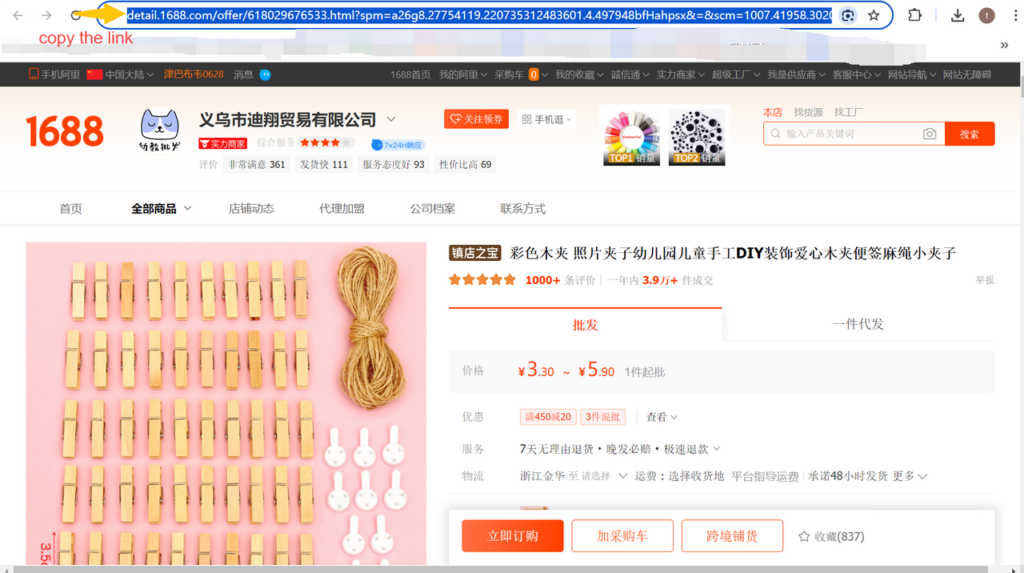
Option 3: Link Search: Find the product you want to purchase on the 1688 platform, copy the link, and paste it into the search bar.
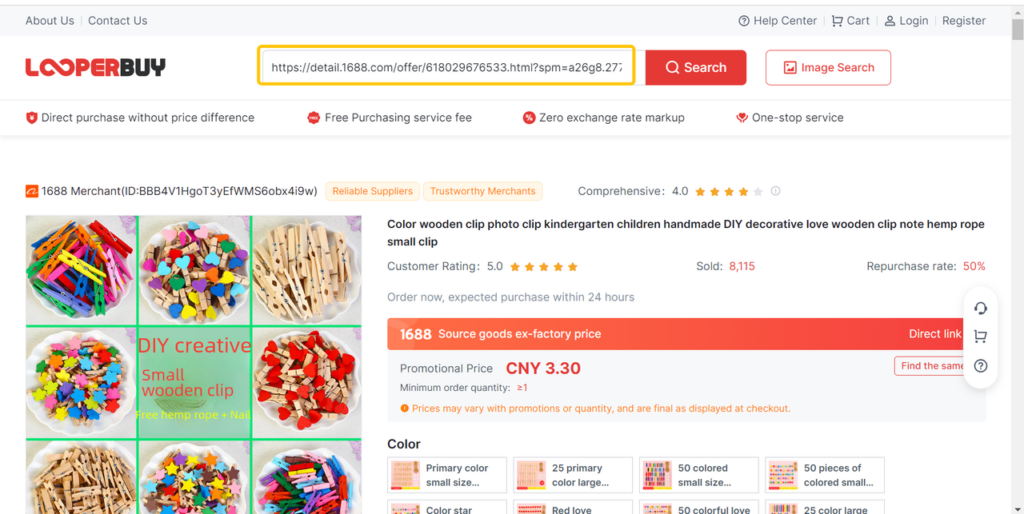
Link Search Results
Step 3: Add to Cart & Buy
After selecting the desired product’s color, size, and quantity, click “Add to Cart” or “Buy Now.” Before placing an order, please review the purchase precautions.
Step 4: Place Order & Payment
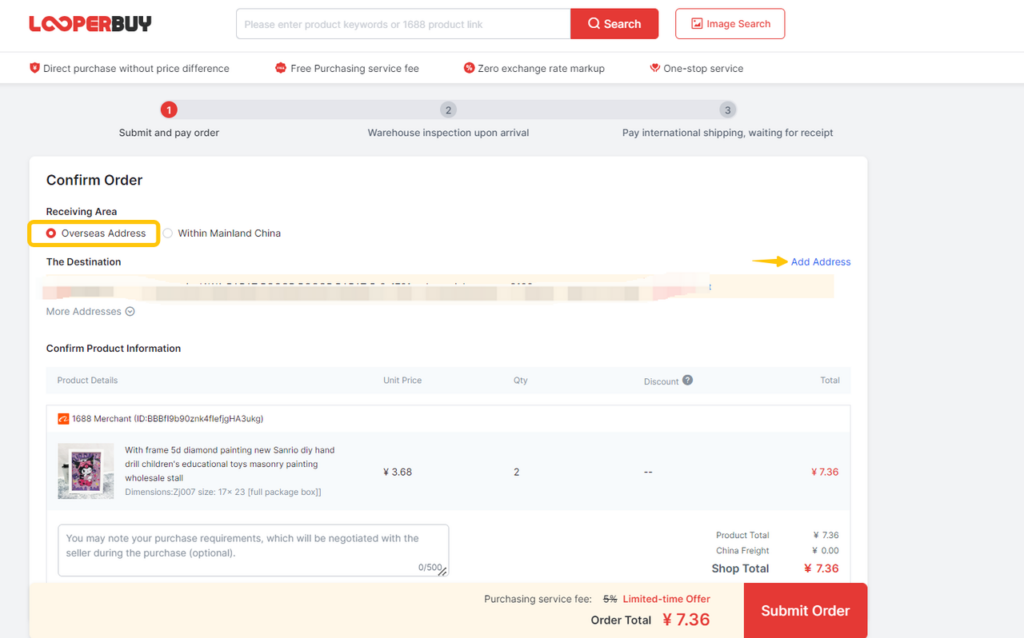
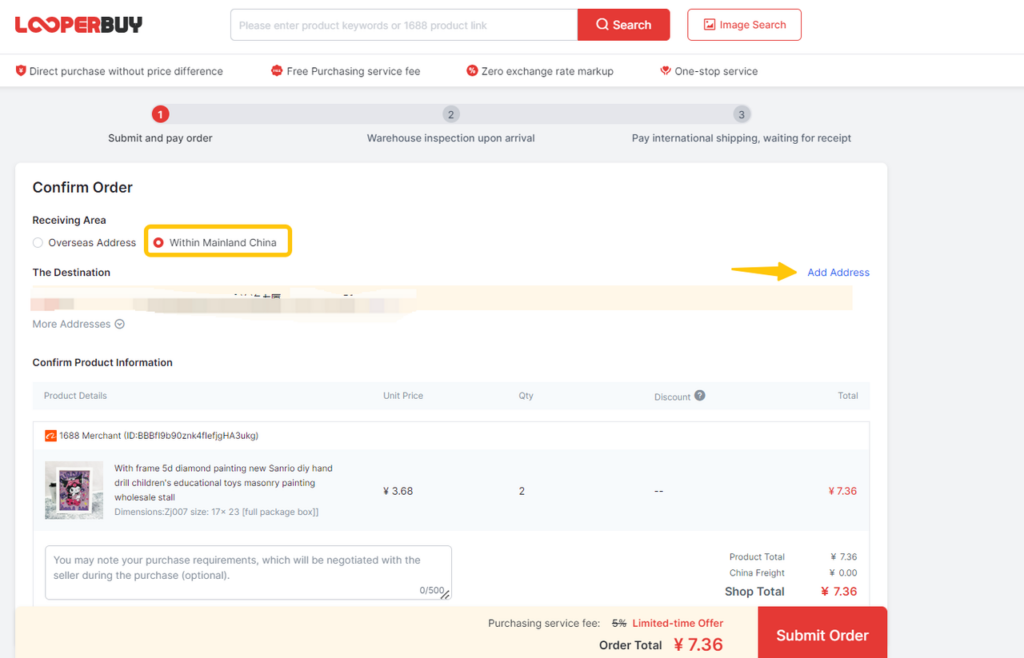
- Address Selection
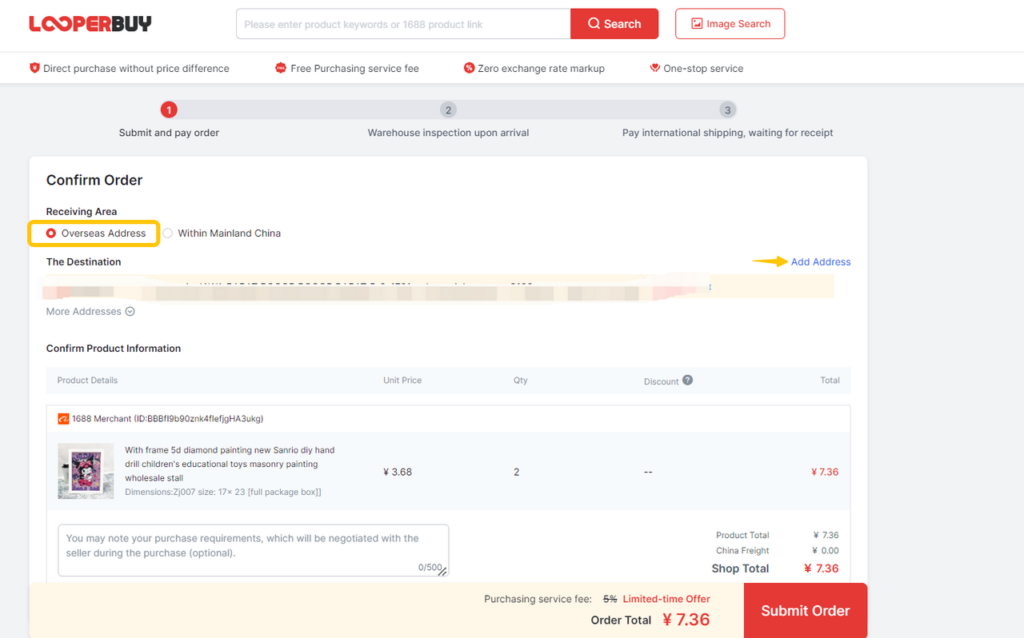
1.1 Overseas Address: Fill in the destination for shipping. Looperbuy will handle the full shipment process.
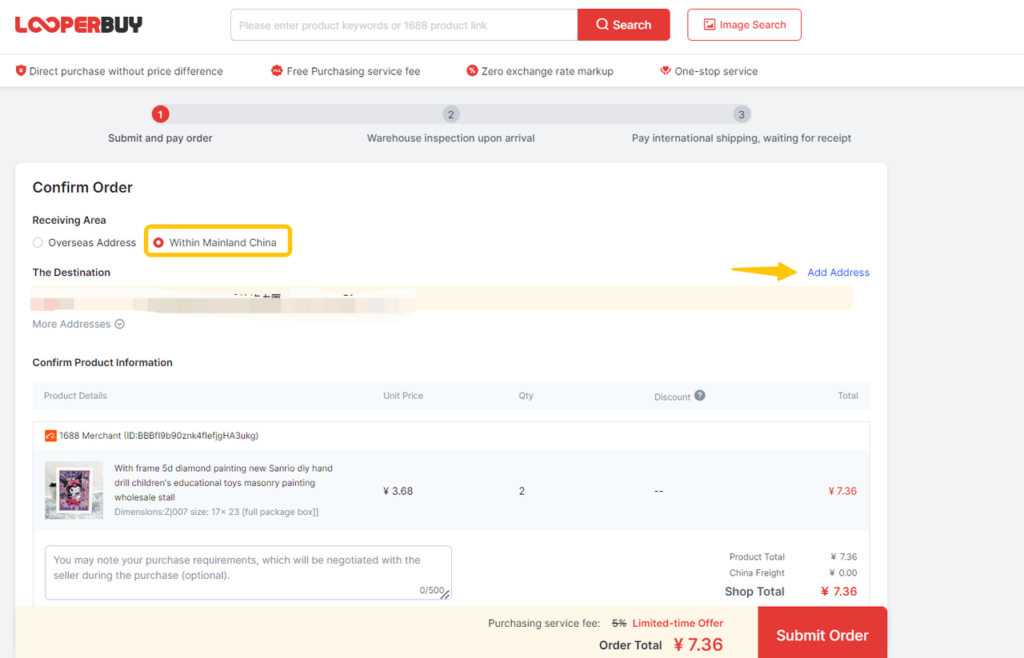
1.2 Mainland China Address: If you have your own warehouse and logistics, you can add a mainland China address, and Looperbuy will ship the products to that address.
- Order Payment
Submit the product order and proceed to checkout. Choose your payment method and pay for the product price and mainland China shipping fee.
Click “Top Up” to recharge and pay for your order.
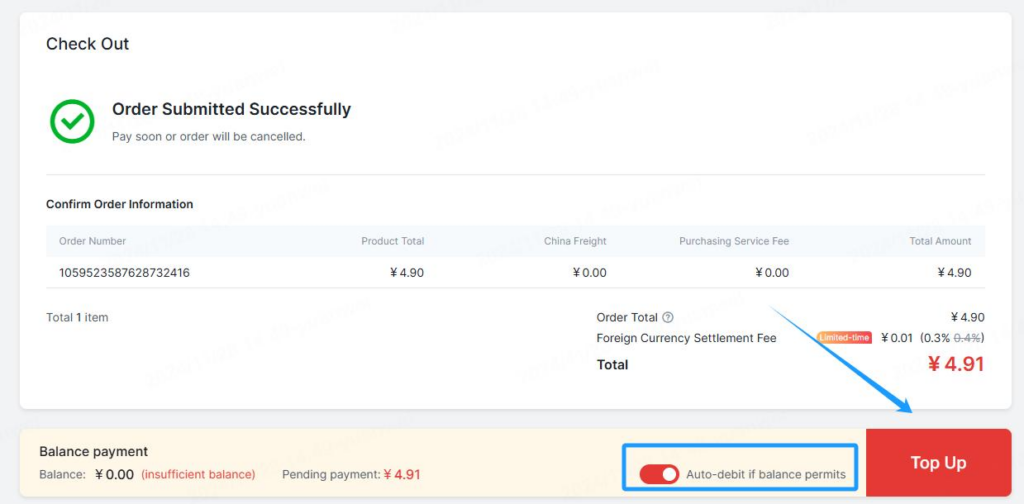
Please note: The “Auto-debit if balance permits” option is enabled by default. If you manually turn it off, the order will not be paid, and the balance will remain in your Looperbuy account.
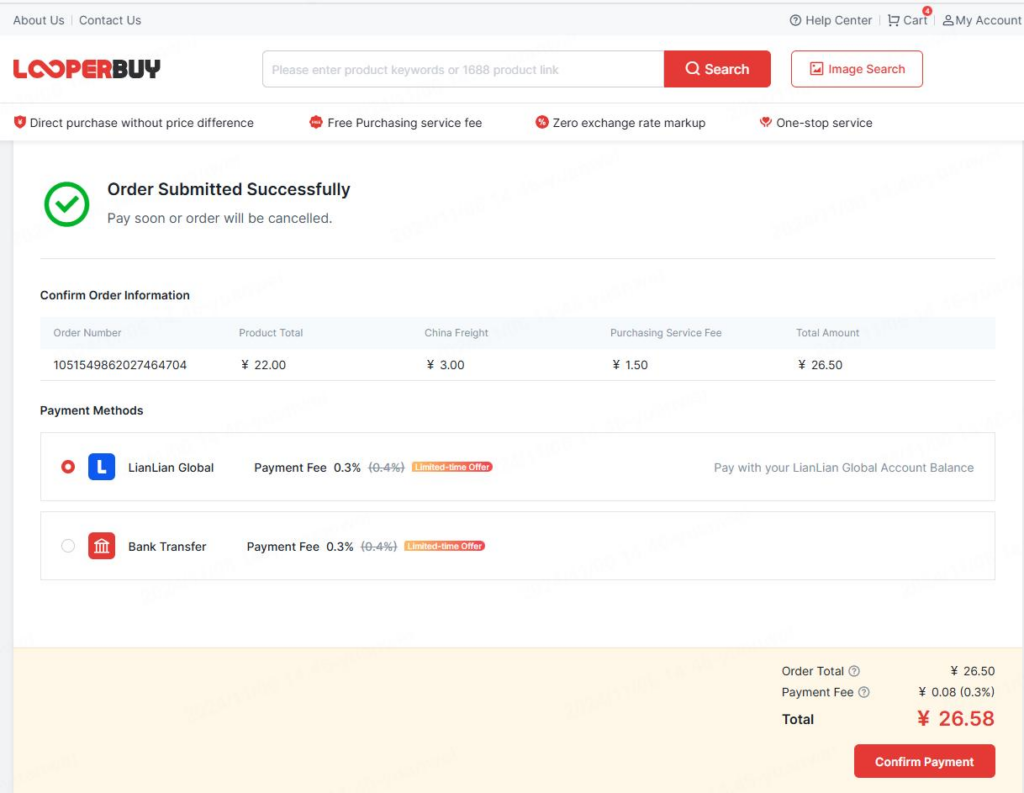
2.1Lianlian B2C Account:
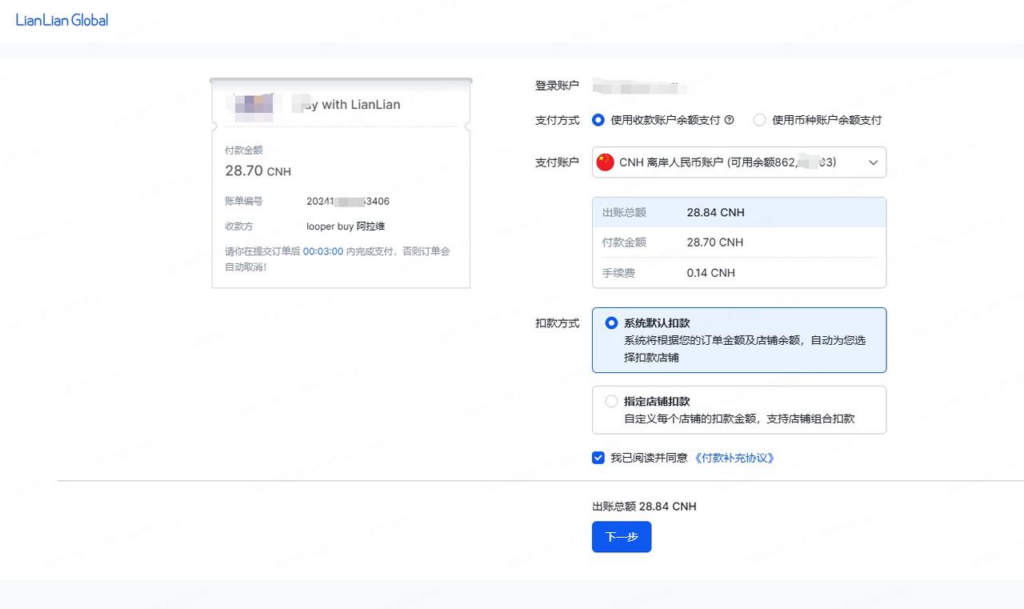
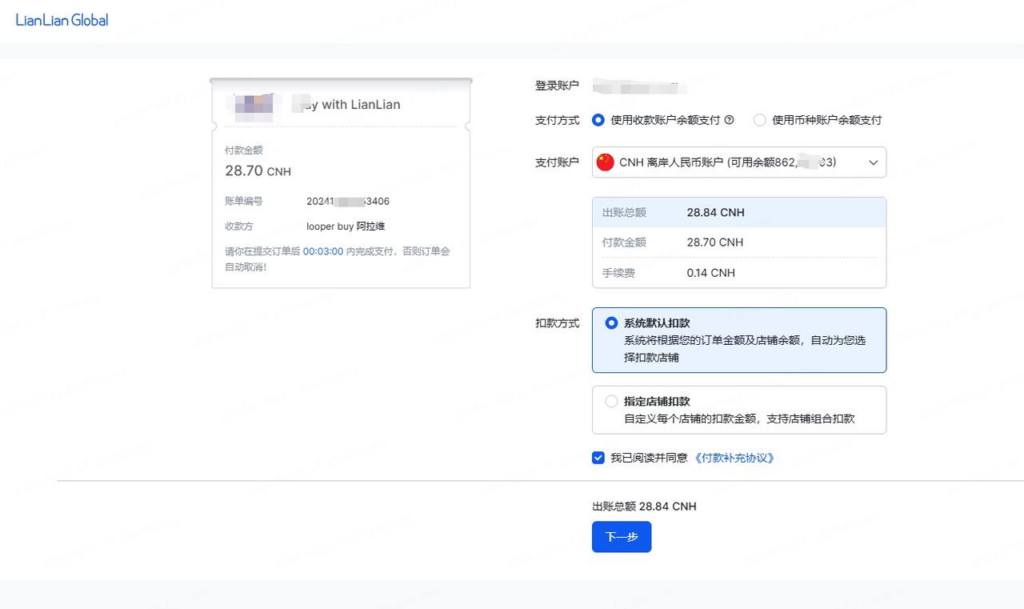
Log in to your account and choose the B2C balance for payment.
After logging in, you can see the payment bill and select the B2C balance for payment.
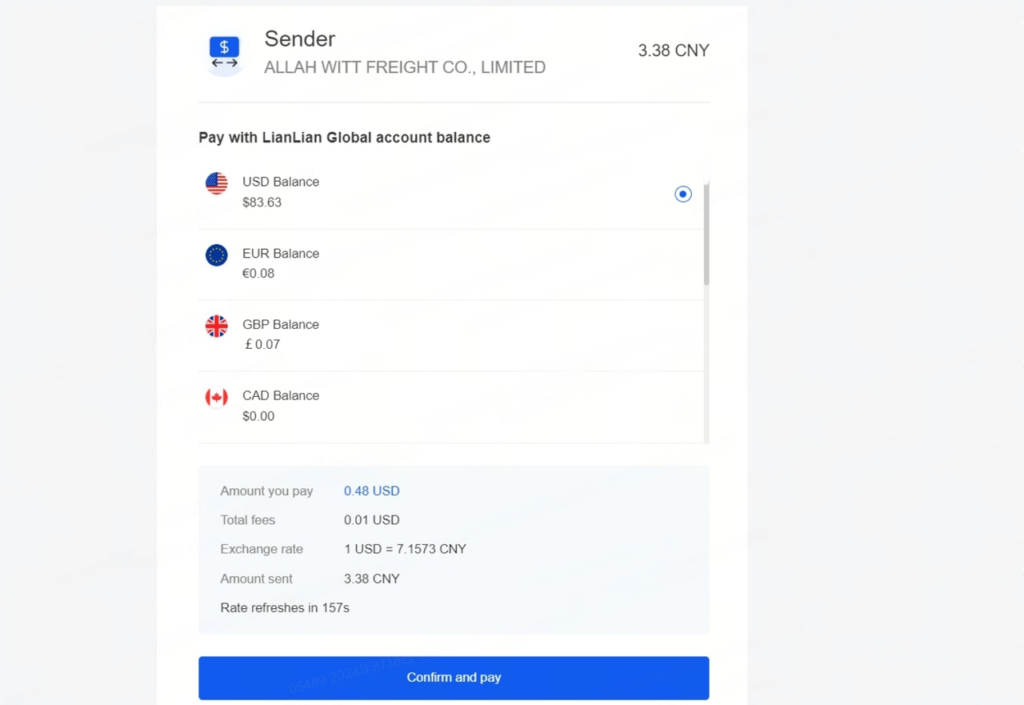
2.2Lianlian Wallet:
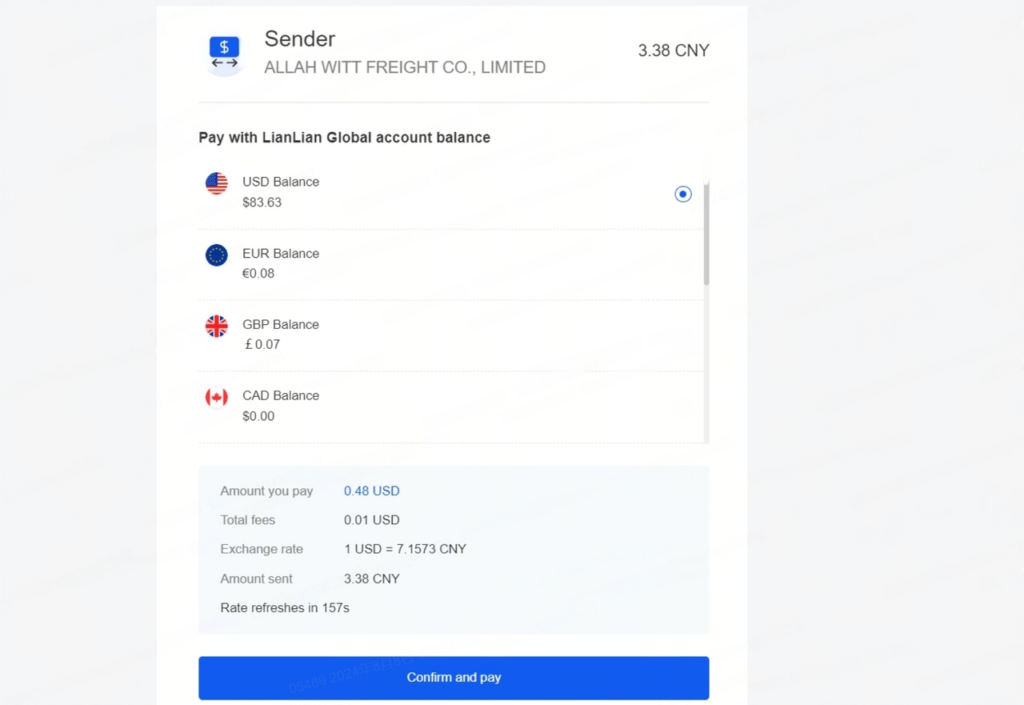
Use Lianlian Wallet balance or top up your wallet for payment.
Click “Confirm Payment” and Looperbuy will automatically redirect to the Lianlian Global website for payment.
2.3Bank Transfer:
Looperbuy currently supports international mainstream multi-currency (EUR, KRW, IDR, JPY, VND, etc.) bank transfers.
Fill in the payer’s information and account number, and transfer to the corresponding currency account.
Fill in the shipping country and remarks for the purchase request.If additional services are needed, check the corresponding services and submit the order after verifying the details.
Step 5: Looperbuy Sourcing
After receiving your order, the order service representative will synchronize your order details with the supplier, who will fulfill the shipment.
- During the order procurement process, you can contact us through “Order Inquiry” to add further details. If necessary, the order service representative will contact you via internal message/email to complete or confirm the information.
Step 6: Looperbuy Inspection & Warehouse Entry
Upon receipt at the domestic warehouse, goods will be inspected, weighed, and stored. Once stored, the items will appear in “My Account” – “Warehouse.”
- You can choose additional services such as custom photos or detailed inspection services before the goods are shipped to your destination and pay for the corresponding fees.
- During receiving and inspection, Looperbuy performs a professional inspection and takes product photos for your review. Any issues found will be promptly communicated to you and assistance will be provided for resolution.
- Afterward, you can either ship the goods to your destination (Steps 7-9) or purchase more goods and consolidate shipments (repeat Steps 2-6), then continue with Steps 7-9.
The warehouse offers 90 days of free storage. You can wait until you gather more products to consolidate and save on international shipping costs.
Step 7: Submit for International Shipping
You can submit the shipping order and double-check or re-enter the recipient’s address, package weight, and volume information.
- Wait for Freight Quote
Note: Currently, Looperbuy cannot directly show the international shipping cost estimate. After you submit the order, within 2-3 business days, the platform will upload the international logistics quotation to the corresponding order backend. You can then click “Details” to check the cost breakdown and make payment.
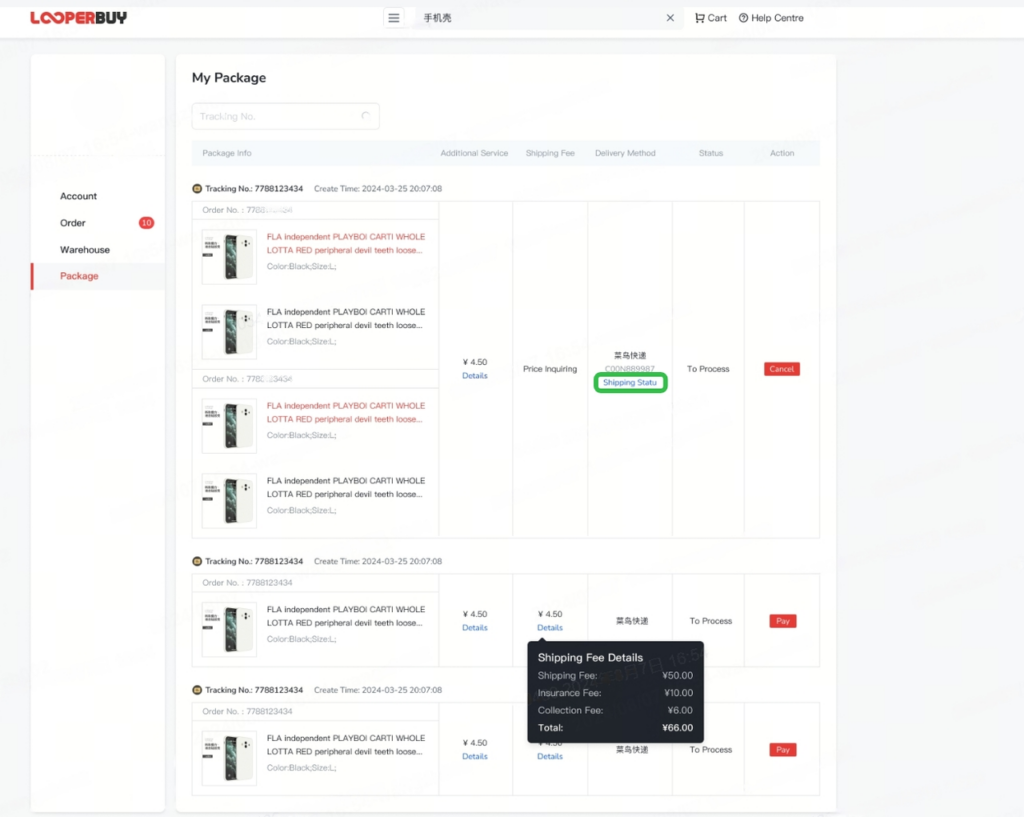
If you require packaging, reinforcement, label removal, or other value-added services, you can select the relevant options or contact customer service through Looperbuy’s online chat for order adjustments.
- Pay for International Shipping
Once confirmed, pay the required fees. Proceed to checkout, double-check the international shipping fee, and click “Submit Order.” Follow the payment steps outlined in “LooperBuy Payment” to complete the payment. Once completed, your order will be prepared for shipment to the provided destination.
Step 8: Looperbuy Shipping, Packaging & Dispatch
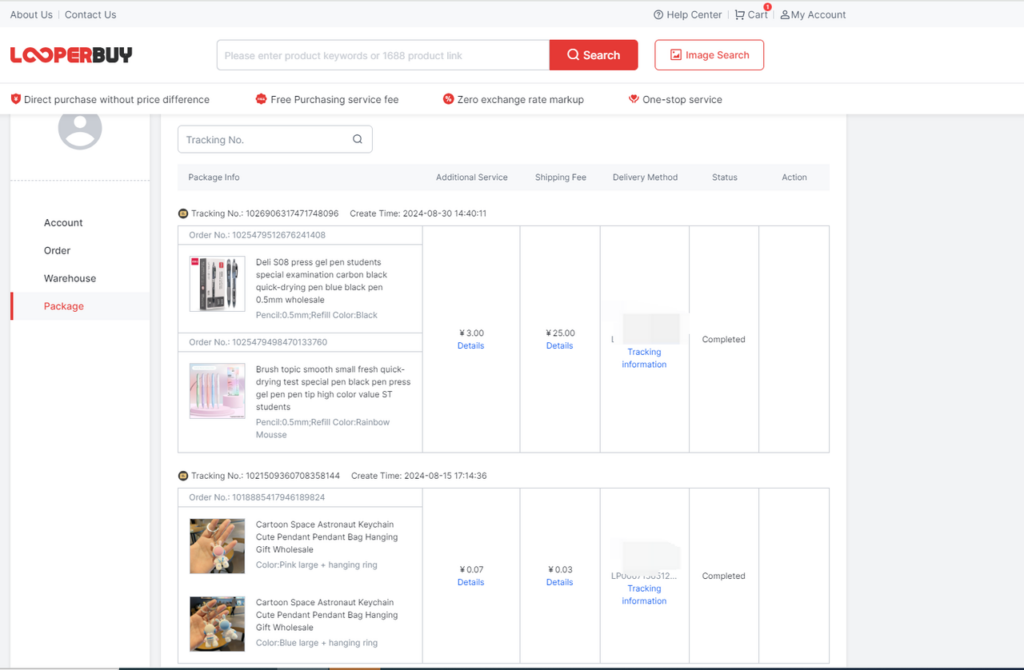
Once dispatched, you can track the logistics information under “My Account” – “My Packages.”
Step 9: Order Arrival & Delivery
You can view the tracking information in the package list and follow the delivery progress. If there’s no update for a long period, please contact customer service via Instagram for assistance.
Finally – Sign for the Package
Once the package is received, confirm receipt in “My Packages.” If there are any issues, contact customer service to submit an after-sales request.
中文版
步骤一:注册&登录
点击Looperbuy首页,进入注册页面(Login With Password),使用邮箱注册Looperbuy账号。
- 填写您的电子邮箱地址,输入邮箱验证码并设置密码。
登录账户:完成注册后,返回网站,使用您的邮箱和密码登录账户。
步骤二:挑选商品
方式一:关键词/分类搜索:在首页或搜索栏中输入您想要购买的商品名称或关键词,点击搜索按钮。
方式二:识图搜索:选择搜索栏右侧的“图片”按钮,即商品图片识别功能,上传商品图片进行搜索。
方式三:链接搜索:在1688平台找到想要购买的商品,复制链接后,在搜索框粘贴商品网址链接。
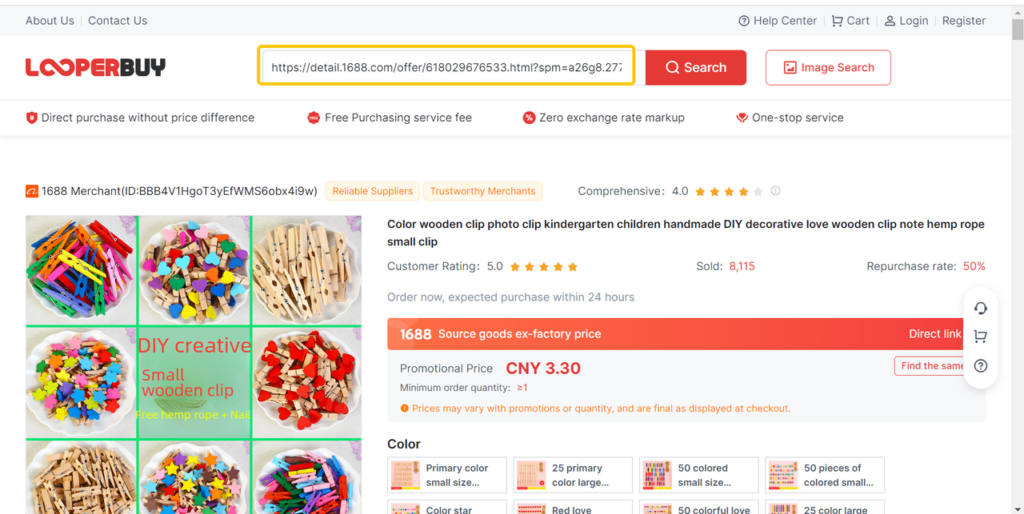
链接搜索结果如下:
步骤三:加购&购买
选择完您需要的商品颜色、尺寸、数量后,点击“加入购物车”或“立即购买”。下单之前,您需阅读购买前注意事项。
步骤四:下单&支付
1.地址选择
1.1海外地址:填写运输目的地,Looperbuy负责全程运输。填写运输目的地,Looperbuy负责全程运输。
1.2中国大陆地址:若您已有自己的仓库和物流,您可以添加中国大陆地址,Looperbuy将负责运输至用户所填写的中国地址。
2.订单支付
提交商品订单,到达收银台,选择支付方式,支付商品售价及中国大陆运费。
点击Top Up进行充值并支付订单。
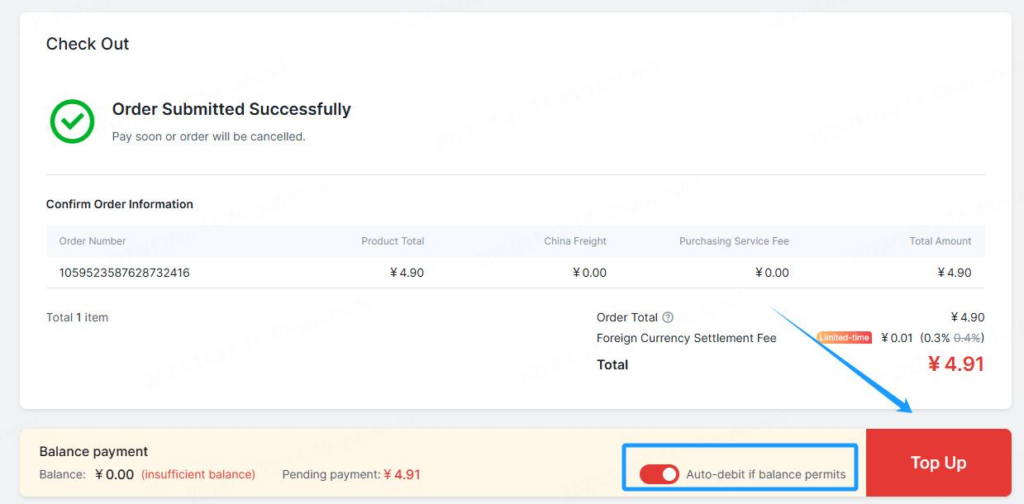
请注意,【在余额允许的情况下自动扣款】按钮已默认开启,若手动关闭,订单将不会被付款,其充值余额会保留在您的LooperBuy账户中。
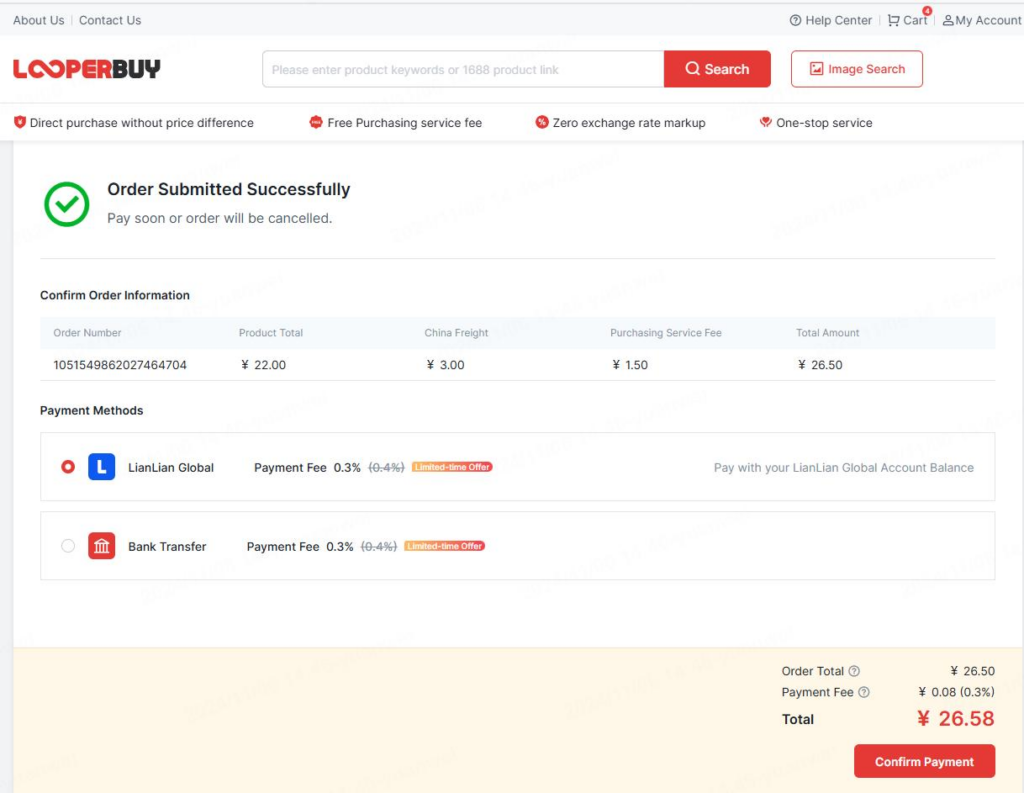
支付方式包括:
2.1已有连连B2C账户:
登录账户,选择B2C付款余额账户进行支付。
登录后,即可看到付款账单,可选择B2C余额进行支付。
2.2已有Lianlian Wallet
使用Lianlian Wallet余额或充值钱包支付。
点击“Confirm Payment”后,Looperbuy网站会自动跳转至Lianlian Global网站进行支付。
2.3银行转账:
Looperbuy目前支持国际主流多币种(如图EUR;KRW;IDR;JPY;VND)的银行账户汇款。
填写付款人的信息和付款人账户号码并向Looperbuy对应币种收款账户信息转账。
填写寄送国及备注购买需求,如需增值服务,可勾选对应的服务,核实无误后提交订单。
步骤五:Looperbuy代采
在收到您的订单后,订单服务专员将代为将您的订单信息同步至供货商,由供应商完成发货等履约行为。
- 订单采购过程中,您可通过“订单咨询”联系我们,补充细节要求;如有需要,订单服务专员会通过站内信/邮件联系您,补全或确认信息。
步骤六:Looperbuy验货入库
国内仓库收货验货,称重入库,入库后商品将会在“My account”-“Warehouse”里显示。
- 您可以选择在货物转运至您目的地之前所需的增值服务如定制拍照等精细验货服务并支付对应的增值服务费用。
- 收货入库时,Looperbuy提供基验货服务拍摄商品实物照片供您查看,发现问题及时反馈您并协助解决。
- 接下来您可以把已入库的商品提交寄送海外(步骤79)或购买更多商品合并提交寄送(重复步骤26),再继续步骤7~9)
仓库提供90天的免费存储,您可以凑齐更多商品合并寄送海外,节省国际运费。
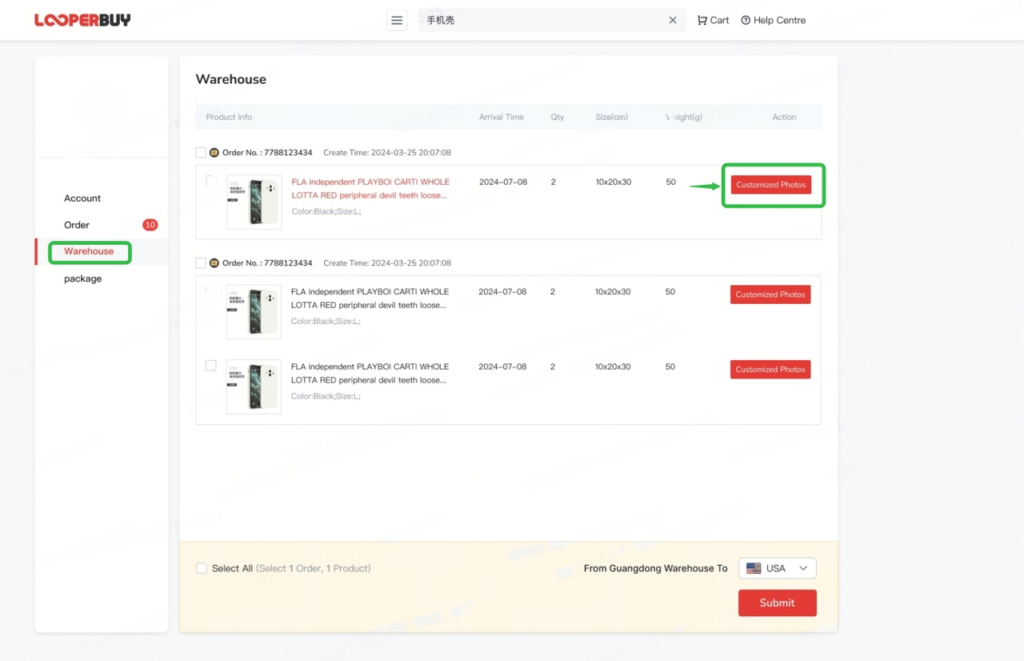
步骤七:提交运送国外
您可以在订单中提交包裹运单,并再次检查或重新填写收件地址、查看包裹重量体积等信息。
1.等待获取运费价格
注意事项: 目前Looperbuy暂无法直接展示国际段运费预估费用,在用户提交订单后2-3个工作日内,平台会上传国际物流报价至对应订单的后台,届时您可以点击details查看运费构成并进行支付。
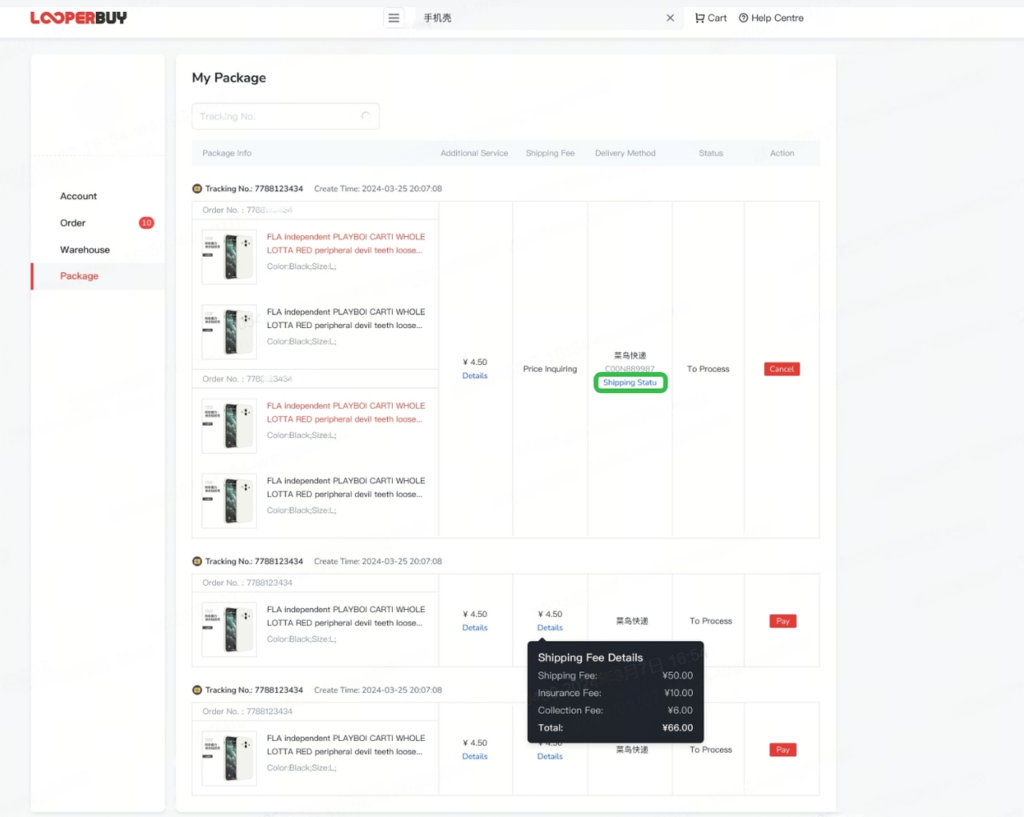
如有去包装、加固、去掉牌等增值服务要求也可以勾选相应服务或通过LooperBuy网站在线窗口联系客服进行订单修改请求或补充订单细节等要求,我们会按照您的要求来打包发货。
2.支付国际段运费
确认无误后,支付所需费用。进入收银台,再次检查国际运费等金额,准确无误后点击“submit order”,然后重复前文LooperBuy支付步骤完成支付。支付完成后你的订单即将准备发往你所填写的目的地。
步骤八:LooperBuy出库、打包、发货
LooperBuy发货后您可在“My Account”-“我的包裹”查询物流跟踪信息。
步骤九:订单到达及派送
在包裹列表页中查看物流轨迹并关注包裹寄送进度,若物流长时间未更新,请咨询客服(http://www.instagram.com)您的物流轨迹。
最后 签收包裹
收到包裹后,“我的包裹”里确认签收;如遇问题,可联系客服提交售后申请。