Serial ATA (SATA) data cables are essential components in modern computer systems, facilitating the connection between storage devices and motherboards. This article delves into the intricacies of SATA data cables, exploring their types, functionalities, and applications, while also addressing common questions related to their use. Understanding these cables is crucial for anyone looking to build or upgrade a computer, as they play a significant role in the overall performance and efficiency of data transfer within the system.
Table of Contents
What is a Serial ATA Data Cable?
A Serial ATA data cable is a type of cable used to connect storage devices such as hard drives and solid-state drives (SSDs) to a computer’s motherboard. The SATA interface was introduced to replace the older Parallel ATA (PATA) standard, offering several advantages, including faster data transfer rates, improved airflow within computer cases, and a more straightforward connection process. The evolution from PATA to SATA marked a significant technological advancement, allowing for more efficient data handling and better overall system performance.
Key Features of SATA Data Cables
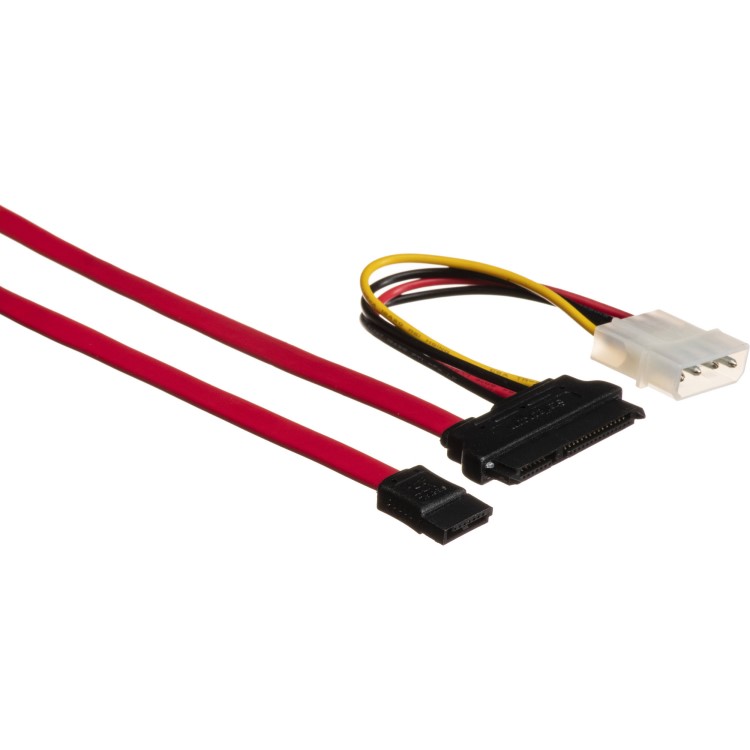
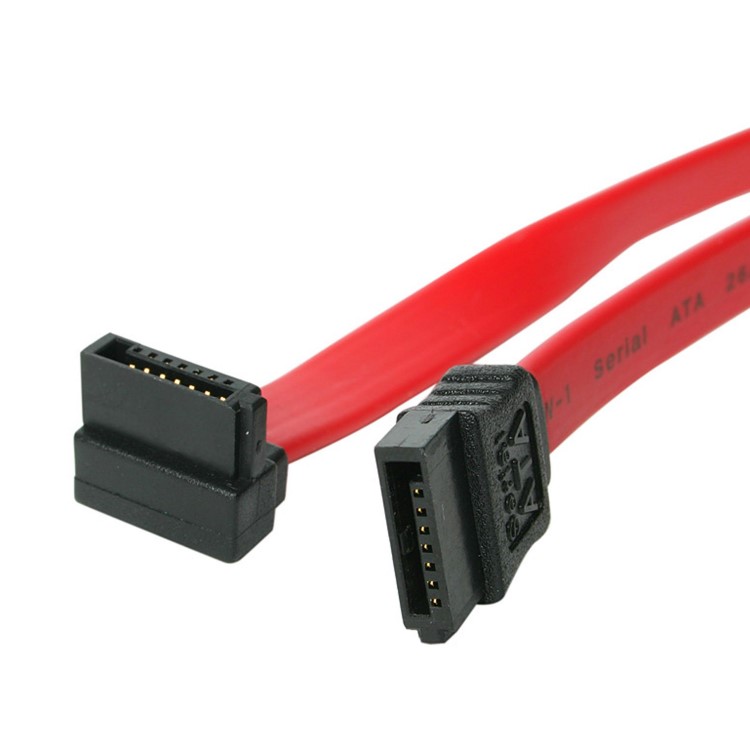
SATA data cables are characterized by their distinctive design and functionality. They typically feature a 7-pin connector on each end, which allows for a secure connection to both the storage device and the motherboard. The cables are usually flat and thin, which helps in managing space within the computer case and improving airflow. This design not only enhances the aesthetic appeal of the internal layout but also contributes to better cooling, which is vital for maintaining optimal performance in high-demand computing environments.
Types of SATA Data Cables
There are several types of SATA data cables available, each designed for specific applications:
1. SATA I (SATA 1.5 Gb/s): The original SATA standard, offering a maximum data transfer rate of 1.5 Gb/s. While largely obsolete, it is still found in some older systems. Understanding the limitations of SATA I is important for users who may be working with legacy hardware.
2. SATA II (SATA 3 Gb/s): This version doubled the data transfer rate to 3 Gb/s, providing better performance for mid-range systems. SATA II is often sufficient for traditional hard drives, but may not fully utilize the capabilities of modern SSDs.
3. SATA III (SATA 6 Gb/s): The most common type in modern systems, SATA III supports data transfer rates up to 6 Gb/s, making it ideal for high-performance SSDs and HDDs. This standard is crucial for users who require fast data access for gaming, video editing, or other intensive applications.
4. eSATA: External SATA cables are designed for connecting external storage devices. They provide the same performance as internal SATA connections but are built to withstand external conditions. eSATA is particularly useful for users who need to transfer large amounts of data between devices quickly.
Advantages of Using SATA Data Cables
SATA data cables offer numerous benefits over their PATA counterparts:
– Higher Data Transfer Rates: SATA cables support significantly higher data transfer rates, which is crucial for modern applications that require fast data access. This capability allows for quicker boot times, faster file transfers, and improved overall system responsiveness.
– Improved Airflow: The flat design of SATA cables allows for better airflow within the computer case, reducing the risk of overheating. This is especially important in systems with multiple drives or high-performance components that generate significant heat.
– Ease of Installation: SATA cables are easier to connect and disconnect, making them user-friendly for both installation and maintenance. This ease of use is beneficial for both novice builders and experienced technicians who frequently upgrade or replace components.
– Hot Swappable: Many SATA devices support hot swapping, allowing users to replace or add drives without shutting down the system. This feature is particularly advantageous in server environments where uptime is critical.
How to Install a SATA Data Cable
Installing a SATA data cable is a straightforward process. Here’s a step-by-step guide:
1. Power Off the Computer: Always ensure the computer is powered off and unplugged before making any hardware changes. This precaution helps prevent electrical damage to components and ensures user safety.
2. Locate the SATA Ports: Open the computer case and locate the SATA ports on the motherboard. These are usually positioned near the power supply. Familiarizing yourself with the motherboard layout can save time during installation.
3. Connect the Cable: Insert one end of the SATA data cable into the SATA port on the motherboard and the other end into the SATA port on the storage device. Ensure that the connectors are aligned correctly to avoid damaging the pins.
4. Secure the Connection: Ensure that both ends are securely connected. Some SATA cables come with locking mechanisms to prevent accidental disconnections. A secure connection is vital for maintaining data integrity during operation.
5. Close the Case and Power On: After connecting the cables, close the computer case, plug it back in, and power it on. Once the system boots, check the BIOS or operating system to confirm that the drive is recognized.
Common Applications of SATA Data Cables
SATA data cables are used in various applications, including:
– Connecting Hard Drives: SATA cables are primarily used to connect internal hard drives and SSDs to the motherboard. This connection is fundamental for data storage and retrieval in any computer system.
– External Storage Solutions: eSATA cables allow for the connection of external hard drives, providing high-speed data transfer. This is particularly useful for users who need portable storage solutions for backups or data transfer.
– Optical Drives: SATA cables are also used to connect CD/DVD/Blu-ray drives to the motherboard. While less common in modern systems, these drives are still relevant for media consumption and data archiving.
– RAID Configurations: In RAID setups, multiple SATA drives can be connected to improve performance and data redundancy. Understanding how to configure RAID with SATA drives can significantly enhance data security and access speeds.
Troubleshooting SATA Data Cable Issues
While SATA data cables are generally reliable, users may encounter issues from time to time. Here are some common problems and their solutions:
Cable Not Detected
If a connected drive is not detected, check the following:
– Ensure that both ends of the SATA cable are securely connected. A loose connection can prevent the drive from being recognized by the system.
– Try using a different SATA port on the motherboard. Sometimes, specific ports may malfunction or be disabled in the BIOS settings.
– Replace the SATA cable if it appears damaged. Physical damage can lead to data transfer failures and should be addressed promptly.
Slow Data Transfer Speeds
If data transfer speeds are slower than expected, consider:
– Checking if the drive is connected to a SATA III port. Using a lower-speed port can bottleneck performance, especially with high-speed SSDs.
– Ensuring that the drive is not fragmented or filled to capacity. Regular maintenance, such as defragmentation and cleaning up unnecessary files, can help maintain optimal performance.
– Updating the motherboard’s BIOS or drivers. Manufacturers often release updates that can improve compatibility and performance with newer hardware.
Frequent Disconnections
If the drive frequently disconnects, it may be due to:
– A faulty SATA cable. Replace it with a new one to ensure a stable connection.
– A loose connection. Ensure that the cable is firmly connected at both ends. Regularly checking connections can prevent unexpected issues.
Conclusion
Serial ATA data cables play a crucial role in modern computing, enabling fast and efficient connections between storage devices and motherboards. Understanding their features, types, and applications can help users make informed decisions when upgrading or building their systems. With the right SATA data cable, users can enhance their computer’s performance and reliability, ensuring that their systems can handle the demands of contemporary software and applications.
How to purchase:https://looperbuy.com/search?keywords=Serial+ATA+Data+Cables
Frequently Asked Questions
1.What is the maximum length of a SATA data cable?
The maximum length for a SATA data cable is typically 1 meter (about 3.3 feet) for optimal performance. Longer cables may experience signal degradation, which can lead to data transfer issues.
2.Can I use a SATA cable for both data and power?
No, SATA data cables are designed solely for data transfer. Separate SATA power cables are required to supply power to the drives. This separation helps maintain signal integrity and reduces interference.
3.Are all SATA cables the same?
No, SATA cables come in different versions (SATA I, II, III) that support varying data transfer rates. It’s essential to use the appropriate cable for your device to ensure optimal performance.
4.Can I connect a SATA III device to a SATA II port?
Yes, SATA III devices are backward compatible with SATA II ports, but the device will operate at the lower SATA II speed. This compatibility allows users to upgrade their storage without needing to replace the motherboard.
5.What should I do if my SATA cable is damaged?
If you notice any physical damage to your SATA cable, it’s best to replace it immediately to avoid data loss or connection issues. Regularly inspecting cables can help prevent unexpected failures.